

The car comes in after second practice with a vibration the driver can’t place. The crew chief wants to know whether it started before or after the right-rear change on lap nine, what the pressures were when it went back out, and whether this is the same thing the car did two events ago. The answers exist somewhere: in the logger, which nobody has pulled yet; on a setup sheet in a binder in the hauler; on a tire tag; in the memory of a mechanic who is now bent over the other car. There are forty minutes until qualifying. The team will make the call on feel, and nobody will be able to say afterward why.
That is how most private and club teams run. A data logger records the session and gets downloaded once the car is back under the awning. Setups live on paper or in a spreadsheet one engineer owns. Tire pressures and temperatures are written on a clipboard and sometimes typed up later. Work done in the shop between events, the parts swapped, the torque values, the hours, lives in a notebook or in nobody’s notebook at all. What’s missing is the thread between them, and there isn’t time between sessions to rebuild it by hand.
This paper is for owners, crew chiefs, race engineers, and car builders who want that thread. It covers what top-tier series do with telemetry and spectrum, what to measure on a club car, how to move data from a moving car to the garage at a track you don’t control, how to keep it private in a shared paddock, and how to roll it out one car at a time. Most of it is useful with tools you already own.
Start with a self-check
Answer these for your own team before spending anything:
- For the last event, can you put the setup sheet, the tire pressures (cold and hot), and the logged data for each session side by side in under five minutes?
- When a part was changed in the shop, is the date, the part, the hours, and the torque spec recorded against that car, where the crew at the track can see it?
- How long after the car stops does the race engineer have the session’s data on a screen? Who has to walk to the car to get it?
- Do you know how many laps and heat cycles are on each set of tires, and which set the car is on right now?
- If an engine temperature or oil pressure trend started three events ago, would anyone have noticed?
- What radios, cameras, and wireless devices are in your car and your pit, and are they registered with the series and legal at every track you visit?
- If a stranger in the next garage joined your pit Wi-Fi, what could they see?
If most of those answers are “no,” “too long,” or “not sure,” the gap is the connection between the car, the shop, and the pit wall.
What the top tier does, and what carries over
Formula 1 is the extreme case. One Mercedes trackside electronics lead described about 30 MB of live data per lap from a car, two or three times that once the car is in the pits and the data is offloaded, and close to a terabyte per car over a weekend once video is included [1]. The same team counts over 250 sensors in an average weekend, sampled anywhere from 1 Hz to 1 kHz [1]. Live data reaches the factory in 10 to 15 milliseconds from a European event and 300 to 400 milliseconds from Australia or Japan [1].
Figure 1. Data volumes and latency for one top-tier car, as published by the team’s own engineers in Racecar Engineering (2022).
The more useful lesson is the radio arrangement. Teams used to put up their own masts and radios at every circuit. The series replaced that with a common telemetry and voice system: access points around the circuit, encrypted data from each car, delivered by fiber to each team’s garage [3]. The team engineer put it plainly: there was “no point in having a race between the people setting up the antennas” [1]. Telemetry runs on frequencies allowed by local authorities, with data encrypted so other teams can’t read it [4], and two-way telemetry to change car settings from the pit is no longer allowed [4]. The shared link is narrow; one account puts it at 5 Mbps across the whole paddock [3].
Three operating details carry straight down to club racing:
-
The car is the master copy. When an F1 car returns to the garage, an umbilical is plugged in and its main job is offloading the telemetry stored during the run, because that bulk is not worth spending scarce radio bandwidth on [2]. The live link carries what the pit wall needs now; everything else waits for a wire.
-
Shared links can be overheard. The same team notes that other teams can listen in on the trackside system, so the driver waits for the umbilical before talking privately in the garage [2].
-
Links fail. The telemetry network, driver voice included, went down for much of a practice session at one event, and at another teams lost the drivers on one section of track [2]. The fallback was a pit board.
Other series made different calls. NASCAR, as reported in 2013, prohibited real-time telemetry in races while permitting it in private testing, largely to hold down cost [5]. In club racing the rules mostly say nothing. The 2026 NASA Spec Miata rules discuss in-car GPS units that the sanctioning body itself may use for compliance checking, without addressing team loggers or telemetry [19]. NASA’s 2026 endurance regulations require transponders and a monitored pit cell phone and encourage radio contact with the driver, again without rules on data systems [20]. Before the first event, ask the series and the track in writing what they allow.
What actually needs to be measured and connected
A private team doesn’t need 250 sensors. It needs the channels that answer the questions it argues about, tied to the work done on the car. Most club cars already carry a logger that reads the ECU. One widely used compact unit records ECU data over CAN, K-Line, or RS232, GPS at 25 Hz, a 6-axis IMU at 100 Hz, and stores to 4 GB internal plus a 16 GB removable drive [17]. Another popular dash logger offers Wi-Fi download at up to 50 meters [18]. In the normal workflow, data moves when the car is parked next to a laptop.
Where there is no logger, OBD-II is the fallback. It runs over CAN, typically exposes 40 to 80 standardized parameters, and requests are usually spaced 300 to 500 ms apart to avoid loading the ECU [16]. That is fine for coolant and oil temperature trends and poor for anything dynamic. Manufacturer-specific CAN traffic carries much more and has to be decoded per car [16].
| Source | Signals | Why it matters |
|---|---|---|
| ECU or logger (CAN, OBD-II) | RPM, throttle, coolant and oil temperature, oil and fuel pressure, lambda, gear | Engine health trends across events, not just within a session |
| GPS and IMU | Position, speed, lateral and longitudinal g, yaw | Lap and sector comparison; places every other channel on the track map |
| Tire pressure and temperature | Per-corner pressure and carcass or surface temperature | Stint behavior, pressure build, set selection |
| Setup sheet | Springs, bars, ride heights, camber, toe, wing, pressures cold | The “why” behind any change in the data |
| Tire log | Set ID, heat cycles, laps, hot pressures, pyrometer readings | Which set to run, and when a set is done |
| Shop work orders | Part, serial, hours, torque spec, technician, date | Links a failure at the track to work done in the shop |
| Pit and repair video | Stop timing, tire change timing, repairs | After-action review without relying on memory |
| Radio and issue log | Driver comments, crew calls, time-stamped | Ties what the driver felt to what the car recorded |
The record that makes all of this useful is one key: car, event, session, lap, time. Once every row carries it, the question from the opening becomes a query.
A reference architecture
The design below is drawn from a private four-car team’s pilot, anonymized here. The team works on its cars in its own shop between events and travels to whichever track hosts the next one. Its goals: capture shop work per car, capture what happens at the track, and keep a near-real-time picture to prepare for the next race and the one after.
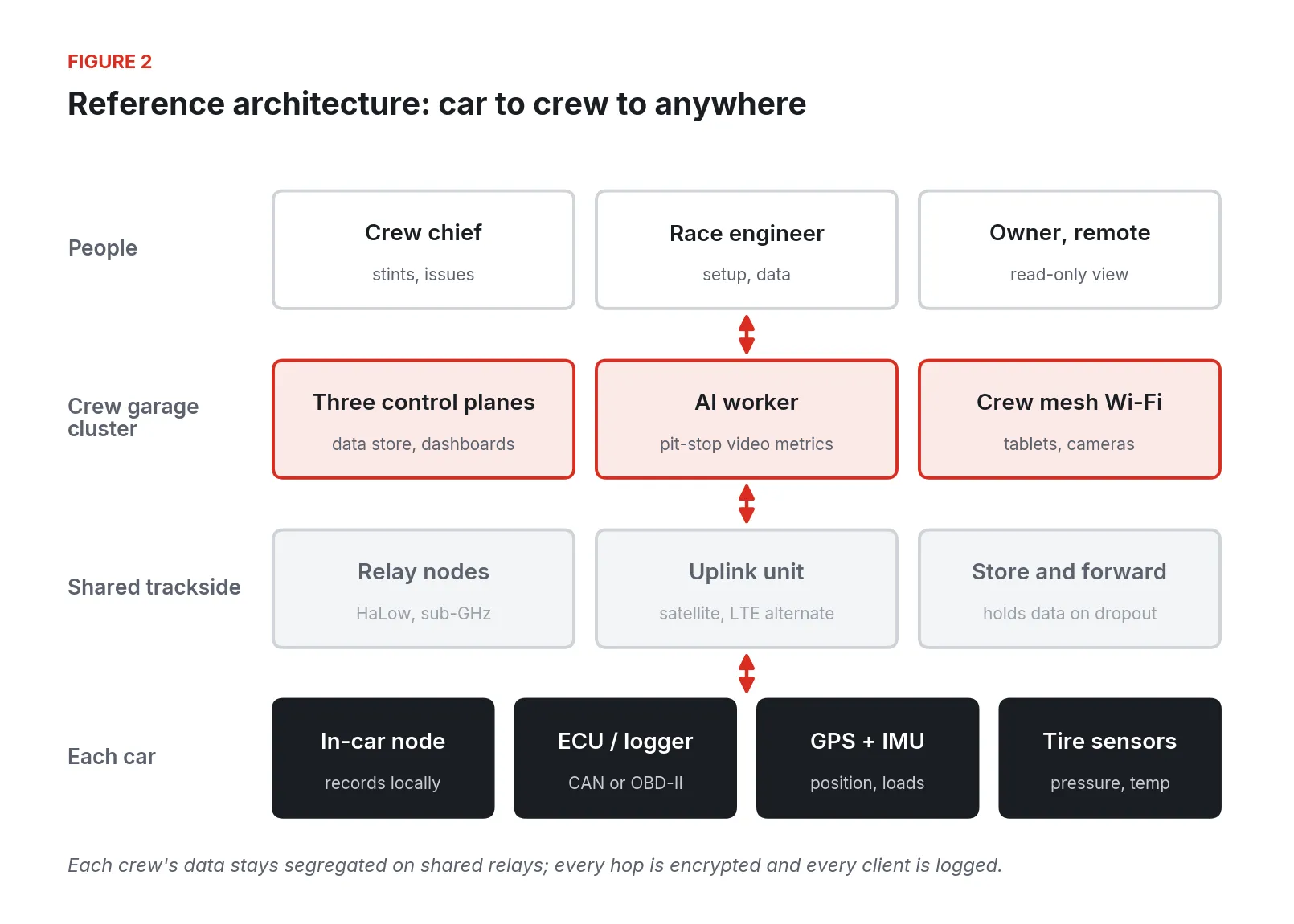
Figure 2. Reference architecture for a private team: in-car nodes, shared trackside relays, a per-crew garage cluster, and the people who use it.
In the car
Each car carries a rugged ARM compute node. It reads the ECU or existing logger over CAN or OBD-II, plus GPS, IMU, tire pressure and temperature, and optionally a camera. It writes everything to local storage first and streams whenever it has a link. The existing logger stays in the car and keeps doing its job.
Car to pit: sub-GHz Wi-Fi
The paddock 2.4 GHz band is crowded before your team arrives. There are only three non-overlapping channels in 2.4 GHz, against a dozen in 5 GHz [15], and every hauler, phone hotspot, and broadcast truck is competing for them. Range is the other problem: a fast car on the far side of a road course may be well over a kilometer from the garage, often behind grandstands, trees, or elevation.
Wi-Fi HaLow (IEEE 802.11ah) runs in license-free sub-GHz spectrum and is rated by the Wi-Fi Alliance at roughly 1 km with strong wall penetration [10]. It uses channels of 1, 2, 4, 8, or 16 MHz, supports up to 8,191 devices per access point, and carries WPA3 security [11][12]. Throughput runs from about 150 kbps to around 80 Mbps depending on conditions [12]. Vendor field tests show what is possible in good conditions: about 1 Mbps at 3 km on a seafront [14], and in one chip vendor’s desert test, 2 Mbps UDP at 15.9 km using a stock evaluation kit and a 1 dBi antenna, the maximum range the standard’s timing allows [13].
The band differs by country. In the US it is 902 to 928 MHz, with digitally modulated systems limited to 1 W conducted output and a 6 dBi antenna allowance before power must be reduced [8]. Australia and New Zealand use 915 to 928 MHz, Japan 916.5 to 927.5 MHz, Korea 917.5 to 923.5 MHz, and Europe only 863 to 868 MHz [11][12]. Europe leaves room only for narrow channels.
Figure 3. Wi-Fi HaLow license-free spectrum available by region, from Argenox (2025) and the Wi-Fi Alliance (2021).
In the pilot design each in-car node reads its GPS position and sets its HaLow radio to the band and power limits of the country it is in, so nobody reflashes a radio in the paddock when the team crosses a border.
Shared trackside, private data
Stationary relay nodes go around the circuit. Like the top tier’s common system, one set of relays serves every crew at the track. A trackside uplink unit carries satellite internet with LTE as an alternate, and holds data in a store-and-forward queue when the uplink drops.
Sharing relays only works if no crew can see another crew’s data. In the design, each crew’s traffic is segregated regardless of which relay carried it. Every client is identified and logged, there are no open Ethernet ports on the relays, and all traffic is encrypted. This follows the zero-trust model NIST describes, in which access is never granted on network location alone and both the user and the device are authenticated before a session begins [22]. Anyone in the pit can get internet through the same gear with no team’s data exposed.
The crew’s garage
Each crew runs three control-plane units inside its own garage on HaLow backhaul. They hold the crew’s data store and dashboards and also provide ordinary mesh Wi-Fi the crew manages for tablets and cameras. Three units means a failed box doesn’t stop the session. The control-plane hardware is rated −40 to +85 °C, which matters in a closed hauler in summer. One fanless GPU-class AI worker runs camera analytics.
Wi-Fi cameras on the pit mesh record repairs and stops. The AI worker turns that video into automatic metrics: stop duration, time per tire change, time from car stopped to jacks down. 360° cameras are a possible addition. The after-action review gets a record that doesn’t depend on who was watching.
Dead zones and store and forward
Every circuit has a corner where the link drops. Delay-tolerant networking keeps data in persistent storage at each node and forwards it when a link becomes available, which is a different assumption from ordinary IP networks that expect only brief queuing [21]. The car records everything locally, streams what it can, and backfills the gap when the next relay comes into range. The pit lane is where full-rate data comes off, just as the top tier uses its umbilical [2].
Figure 4. Store and forward around one lap: the car’s local record is the master copy and the live stream backfills after a dead zone.
Project Horsepower: the operations twin behind it
A telemetry link answers “what is the car doing right now.” A race team also needs to know what was done to each car, by whom, with which parts, and how that compares to the last three events. That is an operations problem with the same shape as a much bigger one: many mobile assets, links that come and go, a crew that needs a live common operating picture, and a complete record for after-action review.
Project Horsepower is Fireball Industries’ multi-domain digital twin system: one core, configured for different domains through plug-in sets. Three configurations share that core:
-
War Horse handles battlefield operational data. It is a battle manager originally built for the US military, based on C5ISR.
-
Workhorse handles industrial floor operations, positioned as a global operations manager.
-
Plow Horse handles agriculture and farm data.
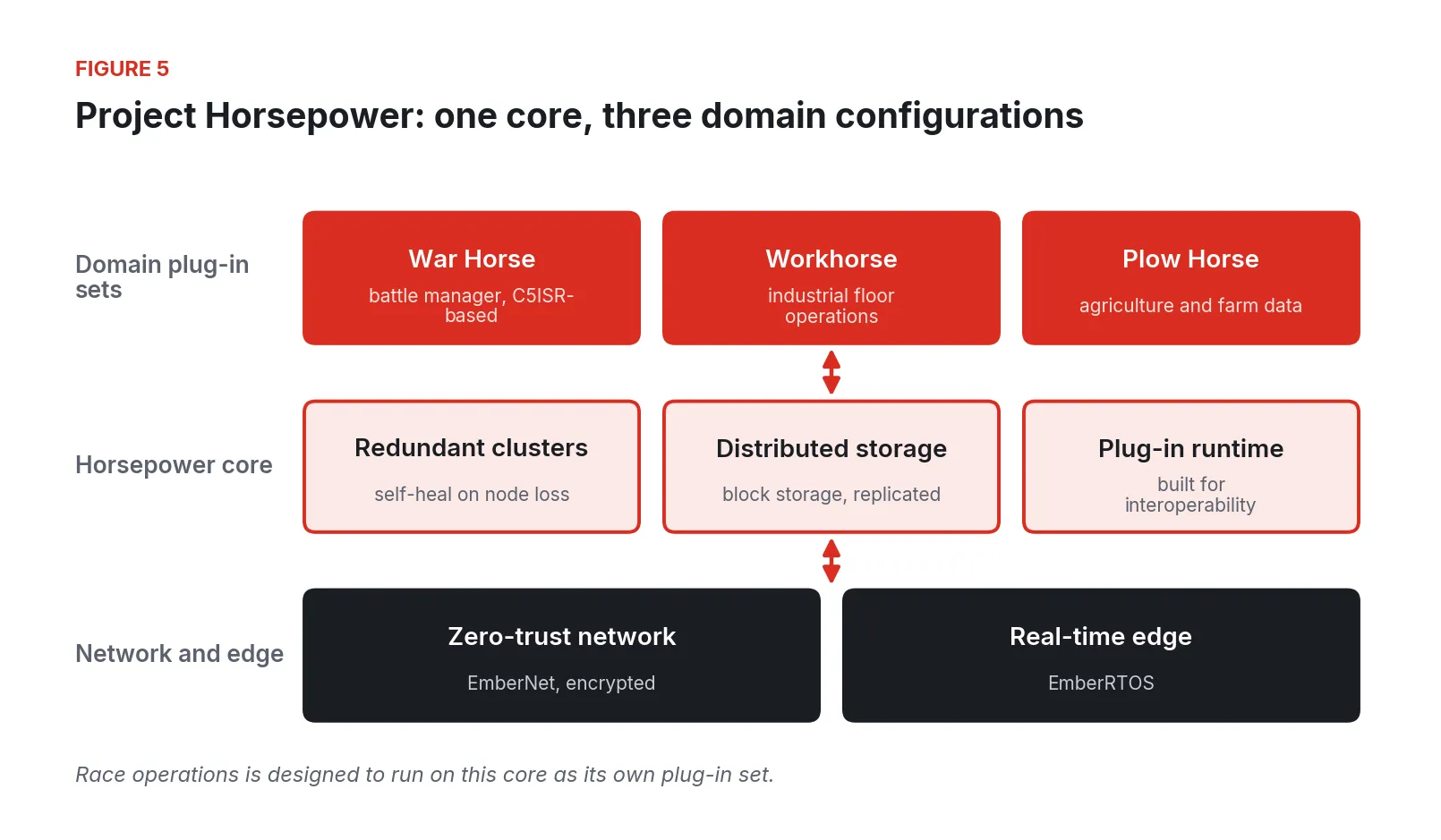
Figure 5. Project Horsepower: one core of redundant clusters, distributed storage, and a plug-in runtime, configured per domain, on EmberNet’s zero-trust network and EmberRTOS’s real-time edge layer.
The core is a set of highly redundant container clusters with distributed block storage that self-heal when nodes are lost. It is built for interoperability and is plug-in based, so domain-specific capability lives in the plug-ins and the core is not tied to any one application. It has been updated with EmberNet’s zero-trust networking, and EmberRTOS gives it a deterministic real-time edge layer.
Race operations fits that core directly. In this design the twin holds each car as an asset with its own history: shop work orders, parts with serials and hours, setup sheets by event and session, tire sets with heat cycles, and the telemetry stream tied to all of it by car, session, and lap. During an event it is designed to present the common operating picture: every car’s position, stint, tire set, and engine health on one screen, with issues raised by crew members time-stamped against the data. After the event it is built to give an after-action review where the setup change, the data, the radio call, and the pit-stop video for any lap sit together.
Fireball runs the same system on its own dirt-track car.
Walking the work, cheapest first
Most of the value arrives before any radio goes in a car.
In the shop
-
Put the setup sheet in a database. One record per car per session, with the fields you already write on paper. A shared spreadsheet with a fixed template is a real start.
-
Log work orders against the car. Part, serial, hours, torque value, who did it, when. A failure at the track should lead to the shop record in one step.
-
Give every tire set an ID. Track heat cycles, laps, cold and hot pressures, and pyrometer readings against that ID.
At the track, no new hardware
-
Download the logger every session, same way, same place. Name files by car, event, session. If the logger supports Wi-Fi download, put a laptop within range of where the car parks [18].
-
Time-stamp the radio and the clipboard. One crew member types driver comments and calls into a tablet as they happen.
-
Write down every radio and wireless device. Some series require it. IMSA, for example, requires teams to register all radio frequencies, digital and analog, for coordination at its events and warns that failure to register may draw penalties [6].
Add the live link
-
Instrument one car. An in-car node reading the existing logger or ECU, plus tire sensors, recording locally.
-
Put up relays where the link is weakest. Walk the circuit with a test node. The far side of the track and the back of the paddock are usually the problem.
-
Bring up the crew’s garage cluster. Three control planes for the data store and dashboards, with the crew’s own mesh Wi-Fi.
-
Add cameras last. Pit-stop and repair video is the richest after-action material and the heaviest load on the network.
Where these projects go wrong
-
Treating the live stream as the record. If the only copy of a session is what arrived over the air, the holes land where the team needs data most. Record on the car first [2][21].
-
Assuming the paddock’s 2.4 GHz will be there. With three usable channels [15] and everyone else’s equipment on them, a link that worked in the shop can fail on race morning.
-
Buying radios for one country. HaLow bands differ by region and Europe’s is only 5 MHz wide [12]. A radio fixed to US channels is illegal or useless elsewhere.
-
Ignoring license-free rules. Unlicensed operation under Part 15 carries no right to any frequency, must not cause harmful interference, and must accept interference from others [9].
-
Shared networks without per-team isolation. On a common trackside system, anything not encrypted per team can be overheard [2].
-
Skipping the series and track. Rules on in-car electronics and radios vary by series and venue. Get the answer in writing before the first event.
-
No common key. Data that isn’t tagged by car, session, and lap can’t be joined to setups or work orders, and the team ends up with a nicer version of the binder.
-
Polling OBD-II for dynamic channels. At 300 to 500 ms per request [16], a fast event is invisible. Use the logger’s CAN stream where it exists.
Spectrum, rules and data security
Race teams don’t have an industrial regulator, but they do have three sets of rules.
Radio regulators. In the US, Wi-Fi HaLow at 902 to 928 MHz operates under FCC Part 15: certified equipment, 1 W conducted maximum for digital modulation, power reduced dB-for-dB for antenna gain above 6 dBi [8], and no protection from interference [9]. Voice radios are different. Business two-way radio frequencies in the Industrial/Business Pool require a station license, and new assignments and operation at temporary locations generally require frequency coordination through an FCC-certified coordinator; Special Temporary Authority is available for short-term needs [7]. The top tier works the same way at a larger scale, operating telemetry on frequencies authorized locally for each event [4]. Outside the US, confirm the national band plan and power limits for every country you race in.
Series and track rules. Register frequencies where the series requires it [6], follow the event’s rules on transponders and pit communications [20], and confirm whether the series permits in-car telemetry, cameras, and additional electronics at all [5][19].
Data security. A shared paddock is an untrusted network. The NIST zero-trust architecture treats every access as authenticated per user and per device, with no trust granted by network location [22]. The ISA/IEC 62443 series addresses security across the lifecycle of automation systems for asset owners, system integrators, and service providers [23], and its discipline of segmenting systems and controlling every connection maps well to a pit. The architecture here supports those controls: per-crew segregation on shared relays, every client logged, no open ports, encrypted traffic, role-based access, and an audit trail. Whether a team meets any particular rulebook is the team’s call and the series’ to judge.
A phased rollout
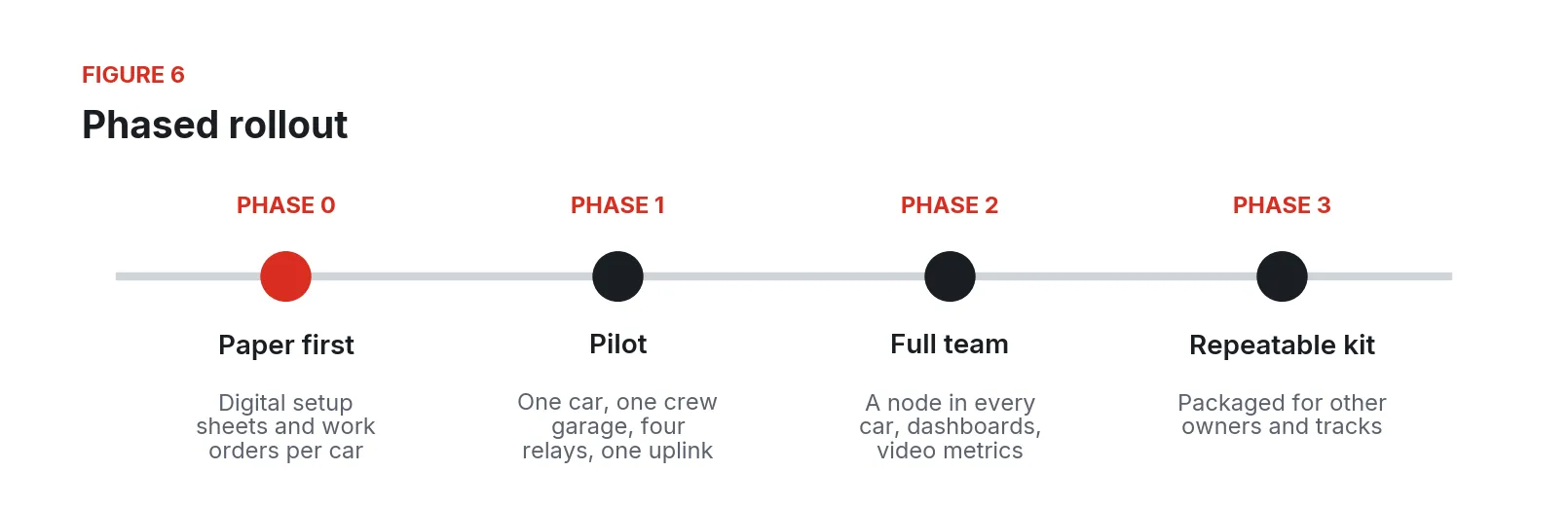
Figure 6. Phased rollout from paper records to a repeatable kit.
-
Phase 0, paper first. Setup sheets, tire logs, and shop work orders moved into structured records keyed by car, event, session, and lap. No radios.
-
Phase 1, pilot. One car with an in-car node, one crew garage with three control planes and pit cameras, and a starter trackside network of four relay nodes plus the satellite uplink unit. Run it through a full event and compare the live picture against the downloaded log.
-
Phase 2, full team. A node in every car, operations dashboards, tire and engine trend analytics, and pit-stop video metrics.
-
Phase 3, repeatable kit. The same design packaged so other owners can buy it and set it up at any track.
The project this paper draws on is in the pilot stage. The underlying remote-access pattern is proven: on September 29, 2026, an engineer in Austin, Texas, downloaded a PLC application from the CODESYS IDE to a virtual PLC running in a container on an industrial PC in Cleveland, Ohio, over EmberNet, with no VPN and no inbound port opened.
What to do Monday
Pick the car you argue about most. Before the next event, make one setup sheet template and one tire log template, give every tire set an ID, and agree on file names for logger downloads by car, event, and session. At the event, have one person time-stamp every driver comment and crew call into a tablet. Afterward, sit down with the setup sheets, the tire log, the logger files, and the comments for that one car, and see how long it takes to answer the question you couldn’t answer in the forty minutes before qualifying. Then list every radio and wireless device in the car and the pit, and check each against the series rules and the band plan for every country on the calendar. That list, and the time it took to answer one question, will tell you where a live system pays for itself.
Fireball Industries is EmberNet’s master integrator. Fireball designs, builds, and supports race telemetry and operations systems like the one described here, from the in-car node and trackside relays to the crew’s garage cluster and the Project Horsepower operations twin, and runs the same system on its own dirt-track car.
Sources
- Stewart Mitchell, Racecar Engineering. “How Data Works in Formula 1.” November 18, 2022. https://www.racecar-engineering.com/articles/how-data-works-in-formula-1/
- Red Bull Racing. “Bulls’ Guide To: Team Radio.” November 12, 2021. https://www.redbullracing.com/int-en/bulls-guide-to-team-radio
- Maurizio Di Paolo Emilio, EE Times Asia. “Critical Electronics in Formula 1 Race Cars.” September 2020. https://www.eetasia.com/critical-electronics-in-formula-1-race-cars/
- Formula 1 Dictionary. “F1 Telemetry.” Undated. https://www.formula1-dictionary.net/f1-telemetry/
- Tim Stevens, Engadget. “The racing line: Exploring NASCAR’s technological dichotomy.” March 13, 2013. https://www.engadget.com/2013-03-13-exploring-nascars-technological-dichotomy.html
- IMSA. “Petition for Frequency Use 2024.” January 4, 2024. https://www.imsa.com/wp-content/uploads/sites/32/2024/01/04/2024-IMSA-Petition-for-Frequency-Use.pdf
- Federal Communications Commission. “Industrial / Business Licensing.” Accessed September 2026. https://www.fcc.gov/wireless/bureau-divisions/mobility-division/industrial-business/industrial-business-licensing
- Legal Information Institute, Cornell Law School. “47 CFR § 15.247: Operation within the bands 902 to 928 MHz, 2400 to 2483.5 MHz, and 5725 to 5850 MHz.” Accessed September 2026. https://www.law.cornell.edu/cfr/text/47/15.247
- Legal Information Institute, Cornell Law School. “47 CFR § 15.5: General conditions of operation.” Accessed September 2026. https://www.law.cornell.edu/cfr/text/47/15.5
- Wi-Fi Alliance. “Wi-Fi CERTIFIED HaLow.” Undated. https://www.wi-fi.org/discover-wi-fi/wi-fi-certified-halow
- Wi-Fi Alliance. “Wi-Fi CERTIFIED HaLow Technology Overview.” November 2021. https://20524844.fs1.hubspotusercontent-na2.net/hubfs/20524844/Wi-Fi_CERTIFIED_HaLow_Technology_Overview_20211102.pdf
- Argenox. “Introduction to Wi-Fi 802.11ah HaLow.” April 19, 2025. https://argenox.com/library/wifi/introduction-to-wi-fi-802-11ah-halow
- Morse Micro (vendor). “Pushing the limits: Wi-Fi HaLow Testing in Joshua Tree National Park.” September 2024. https://www.morsemicro.com/news/pushing-the-limits-wi-fi-halow-testing-in-joshua-tree-national-park
- Edd Gent, IEEE Spectrum. “Low-Power Wi-Fi Extends Signals Up to 3 Kilometers.” February 1, 2024. https://spectrum.ieee.org/wi-fi-halow
- Intel. Support article 000005725, Wi-Fi channel and data rate guidance. Accessed September 2026. https://www.intel.com/content/www/us/en/support/articles/000005725/wireless.html
- CSS Electronics. “OBD2 Explained: A Simple Intro.” Accessed September 2026. https://www.csselectronics.com/pages/obd2-explained-simple-intro
- AiM (vendor). “AiM XLog.” Accessed September 2026. https://www.aimsports.com/us/products/xlog/index.htm
- Aim Technologies (vendor distributor). “Solo 2 DL Data Logger.” Accessed September 2026. https://www.aimtechnologies.com/aim-solo-2-dl/
- National Auto Sport Association. “2026 Spec Miata Rules,” version 1.3. 2026. https://nasa-assets.s3.amazonaws.com/document/document/24175/2026_Spec_Miata_Rules.pdf
- National Auto Sport Association. “Endurance Racing Regulations,” version 2026.2. April 28, 2026. https://nasa-assets.s3.amazonaws.com/document/document/24174/enduro2026.2.pdf
- V. Cerf, S. Burleigh, A. Hooke, L. Torgerson, R. Durst, K. Scott, K. Fall, H. Weiss, IETF. “RFC 4838: Delay-Tolerant Networking Architecture.” April 2007. https://www.rfc-editor.org/rfc/rfc4838
- Scott Rose, Oliver Borchert, Stu Mitchell, Sean Connelly, NIST. “SP 800-207: Zero Trust Architecture.” August 2020. https://csrc.nist.gov/pubs/sp/800/207/final
- International Society of Automation. “ISA/IEC 62443 Series of Standards.” Accessed September 2026. https://www.isa.org/standards-and-publications/isa-standards/isa-iec-62443-series-of-standards