

Walk a typical multi-vendor packaging line from depal to stretch wrapper and count the computers. The filler has a Windows HMI PC in its operator station. The capper came from a different OEM with a different PC and a different Windows build. The labeler has a panel PC with a license dongle taped inside the door. The case packer and palletizer each have their own screen, and somewhere in the electrical room there is a box per skid that the OEM installed so its service engineer can dial in. Nobody is sure which ones are still live.
Each PC made sense the day its machine was bought. Together they are a maintenance load nobody budgeted for: a dozen standalone machines means a dozen patch schedules, a dozen backup images (if they exist), a dozen license renewals, and a dozen remote-access paths, and the line’s performance data is spread across all of them in formats that don’t agree. When the line supervisor asks why the line ran at 62 percent last Tuesday, the answer comes from a clipboard.
Consolidation means something specific here. The OEM PLCs stay. Each machine keeps its controller, its safety circuit, and its logic. What moves is everything above the PLC: the HMI runtimes, the alarm and state data, the historian, the OEE calculation, and the remote-access path. Those move onto a small edge cluster in the plant that serves every screen on the line and keeps the line’s history on premises, with no routing through anyone’s cloud.
This paper gives the engineers who own those lines a self-check for your own site, a list of the tags that actually matter, a reference architecture, a step-by-step path from cheap fixes to a full line, the ways these projects go wrong, and what the relevant security standards expect. Most of it is useful whether or not you ever use EmberNet.
Start with a self-check
Try to answer these about one line, today, without walking out to look:
- How many PCs run HMI, SCADA, or data-collection software on the line, and which Windows version and build is each one running?
- Which of those operating systems is past its vendor’s end of support, and what is the plan for each?
- How many OEM remote-access gateways or modems are on the line, who holds the credentials, and when was each one last used?
- If the labeler’s HMI PC failed at 2 a.m., where is the backup image, and how long would it take to restore it on new hardware?
- What was the line’s OEE last week, and how much of the loss was changeover, how much was minor stops, and how much was the machine being starved or blocked by a neighbor?
- Do your machines report a common state model (PackML or otherwise), or does each OEM describe “running” and “faulted” in its own words?
- Which machine is the constraint, and how do you know?
If questions 1 to 4 take more than an afternoon, the PC sprawl is already costing engineering hours. If 5 to 7 rest on manual logs, improvement decisions rest on estimates.
Why this is worth doing
The OEE gap is mostly in the small losses
Overall Equipment Effectiveness multiplies availability, performance, and quality. The figure most engineers quote as world class, 85 percent, traces back to Seiichi Nakajima’s TPM work; he set it from availability of 90 percent, performance of 95 percent, and quality of 99 percent, which he treated as minimums to strive for [1]. Vorne Industries, which sells OEE monitoring equipment, describes 60 percent as fairly typical for discrete manufacturers and 40 percent as common for plants just starting to measure [3]. Its own guidance says to focus on improving the number rather than fixating on its absolute value [1].
The six big losses framework sorts where the gap goes. Setup and adjustments, mostly changeovers, sit in availability. Idling and minor stops, usually under five minutes and cleared by the operator without maintenance (misfeeds, jams, a flipped bottle in the infeed), sit in performance along with reduced speed [2]. A packaging line has these in volume, and manual logs miss them: an operator clearing a jam at the labeler does not stop to write it down.
A 2025 study of a beverage bottling line in the journal OPSI shows the pattern. Average OEE was 69.35 percent. Availability was 97.9 percent and quality 99.9 percent, but performance was 70.9 percent, and reduced speed accounted for 28.48 percent of the loss, while recorded minor stoppages were 0.24 percent [4]. One reasonable reading of numbers like these, offered here as an inference rather than the study’s conclusion, is that short stops on a line without automatic state capture often end up booked as “slow running.” Either way, the loss lived in performance, which needs machine-level state data to diagnose.
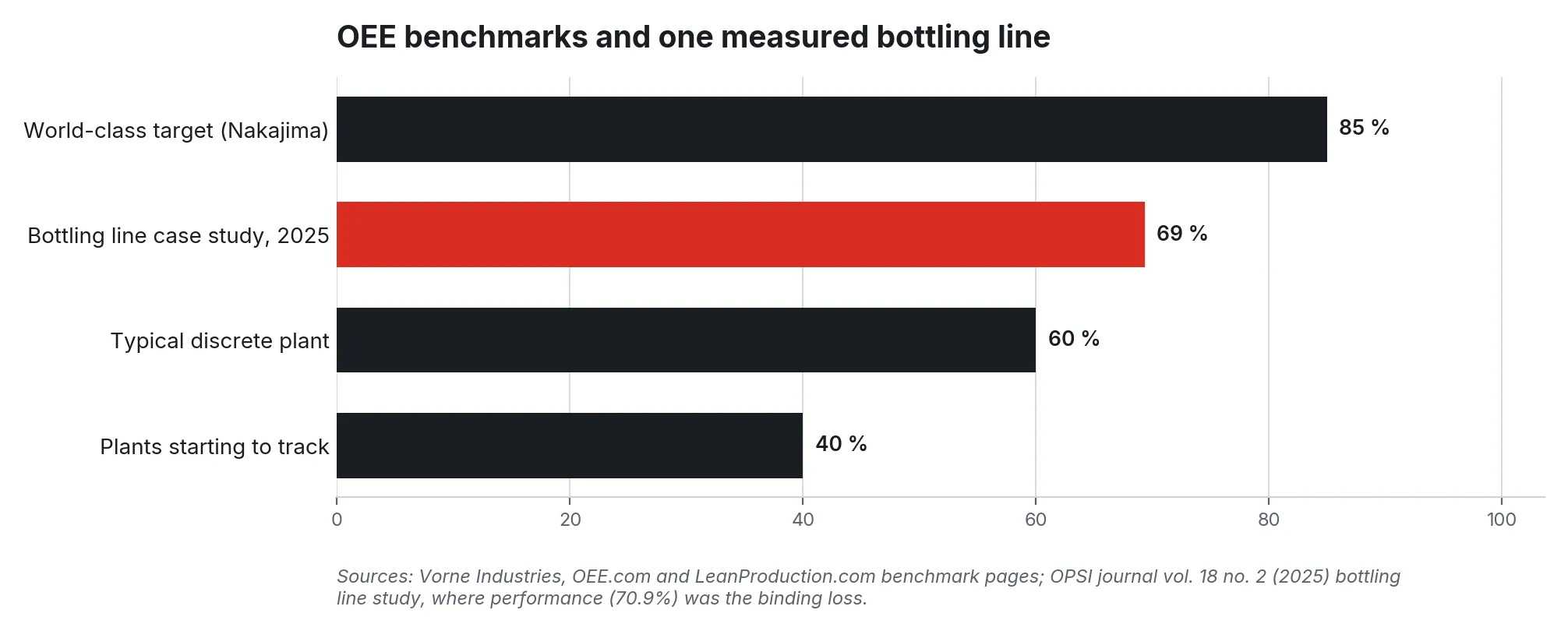
Figure 1. OEE benchmarks from Vorne Industries’ published pages compared with one measured bottling line (OPSI, 2025). The case study’s loss was concentrated in performance.
The PCs themselves have become a liability
Windows 10 Home and Pro, and the regular Windows 10 IoT Enterprise channel, reached end of support on October 14, 2025 [11][12]. Windows 7, still found inside older packaging machines, lost extended support in January 2020 and its paid extended security updates in January 2023 [13]. Windows 10 IoT Enterprise LTSC 2021 runs longer, with extended support to January 2032 [14], so a machine’s exact edition matters, and the inventory in self-check question 1 is the place to find out.
CISA lists the use of unsupported software in critical infrastructure on its catalog of bad practices, noting that the risk is significantly higher when the system is reachable from the internet [15]. The same catalog says single-factor authentication for remote or administrative access is dangerous for the same reason [15]. A packaging line with a vendor modem per skid and a shared password taped to the cabinet meets both descriptions.
The incident data agrees. Dragos, an OT security vendor, reported in its 2026 year in review that 73 percent of its all-time incident response cases involved compromised VPN or jump-host credentials, that 81 percent of its assessments found inadequate IT/OT separation, and that manufacturing made up more than two-thirds of the 3,300 industrial organizations hit by ransomware in 2025 [18]. OEM remote-access gateways are not immune: in 2024 researchers at SySS disclosed flaws in a widely used industrial VPN gateway that allowed unauthenticated root access, and the manufacturer issued patched firmware [17].
Figure 2. Security pressures on standalone HMI PCs and remote-access boxes. Figures from the Dragos 2026 OT Cybersecurity Year in Review (one vendor’s incident and assessment data) and Microsoft lifecycle pages.
What actually needs to be connected
PackML is the shared vocabulary that makes a multi-vendor line legible. Published by ISA as ANSI/ISA-TR88.00.02, it extends ISA-88 batch concepts to discrete machines with a standard state model, unit modes, and a tag structure called PackTags, split into Command, Status, and Admin tags [5]. The 2022 revision trimmed the document to a minimum set of tags and states and added PackTags to fill gaps [6]. The OPC Foundation’s companion specification, OPC 30050, defines the same model as an OPC UA information model [7]; it lists the states, from Idle and Execute through Held, Suspended, Stopped, and Aborted, along with Admin counters such as ProdProcessedCount, ProdDefectiveCount, and StopReason [8].
Adoption is uneven, and you should plan for that. A 2016 survey reported by PMMI’s OEM Magazine found that nearly 60 percent of OEMs were familiar with PackML against just over 40 percent of end users, and that end users had not asked for it often enough to create demand [9]. On most brownfield lines some machines expose PackTags, some expose a vendor’s own state word, and some expose only a running bit and a fault bit. The consolidation work maps each machine’s tags into one common model at the edge, so the line reads consistently even when the machines don’t.
| Signal | Typical source | Why it matters |
|---|---|---|
| Machine state (StateCurrent or OEM state word) | Each OEM PLC, via OPC UA or native driver | The basis of every availability and performance number |
| Unit mode (Production, Maintenance, Manual) | PLC mode tag | Separates planned maintenance time from lost production time |
| Stop reason / first-out alarm | PLC StopReason or alarm array | Turns “it stopped” into “it stopped for a missing cap” |
| Blocked and starved | PLC Status tags or accumulation photo-eyes | Tells you which stops belong to a neighbor, and finds the constraint |
| Good and reject counts | ProdProcessedCount, ProdDefectiveCount, checkweigher, vision system | Quality factor and yield, by product |
| Actual and set speed | CurMachSpeed, MachSpeed | Performance loss and reduced-speed running |
| Product or recipe ID | PLC recipe tag, MES or line schedule | Splits changeover time and ties losses to SKUs |
| PC and software inventory | Each HMI PC, gateway, and modem | OS support status, licenses, remote paths, backup state |
Timestamp at the edge at sub-second resolution; a 40-second jam disappears inside a one-minute poll. Where a machine reports only running and faulted, starved and blocked can often be reconstructed from accumulation conveyor photo-eyes, which is cheaper than reprogramming the OEM’s PLC.
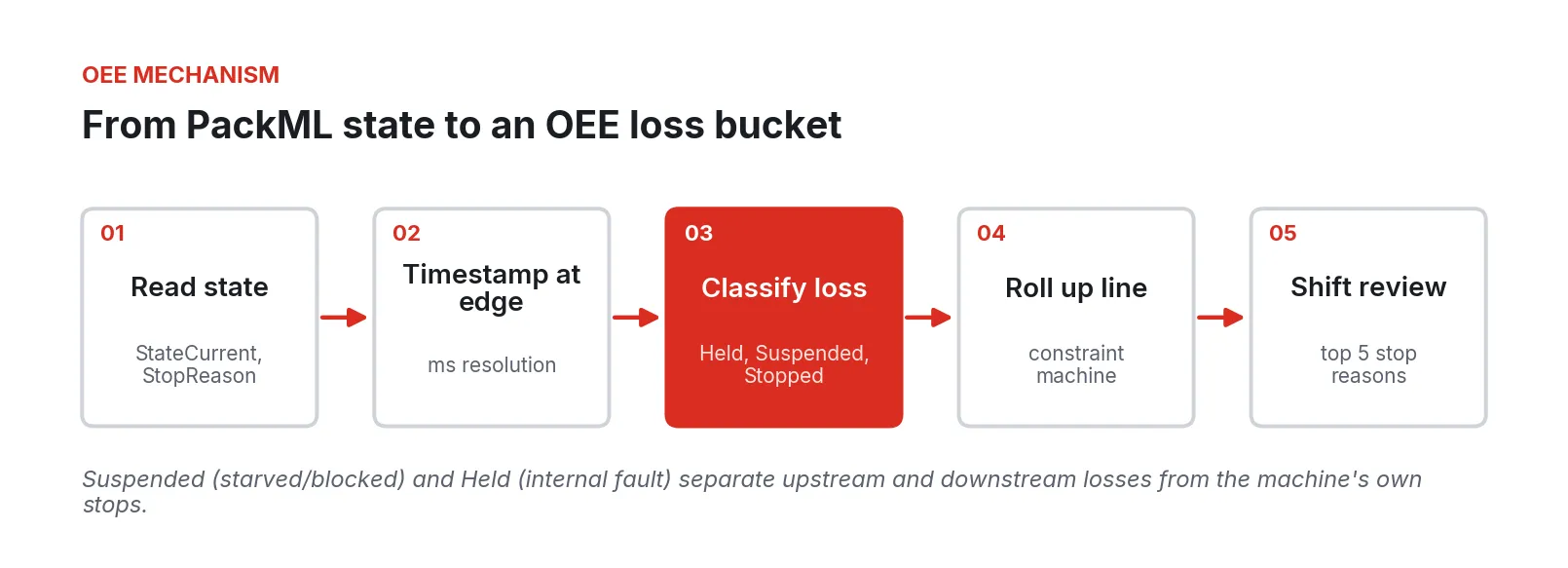
Figure 3. How a state change on one machine becomes an OEE loss bucket. Separating Suspended from Held is what distinguishes a machine’s own stops from upstream and downstream losses.
A reference architecture
The OEM PLCs keep running the machines. Above them, a segmentation layer puts each machine in its own network zone and maps its tags into the line’s common model. A small edge cluster of two or three industrial PCs runs HMI runtimes, an OEE engine, a historian, and an OPC UA and MQTT data hub. A console gives each role its view and records who changed what, and the OEM’s service engineer comes in through a brokered, logged session.
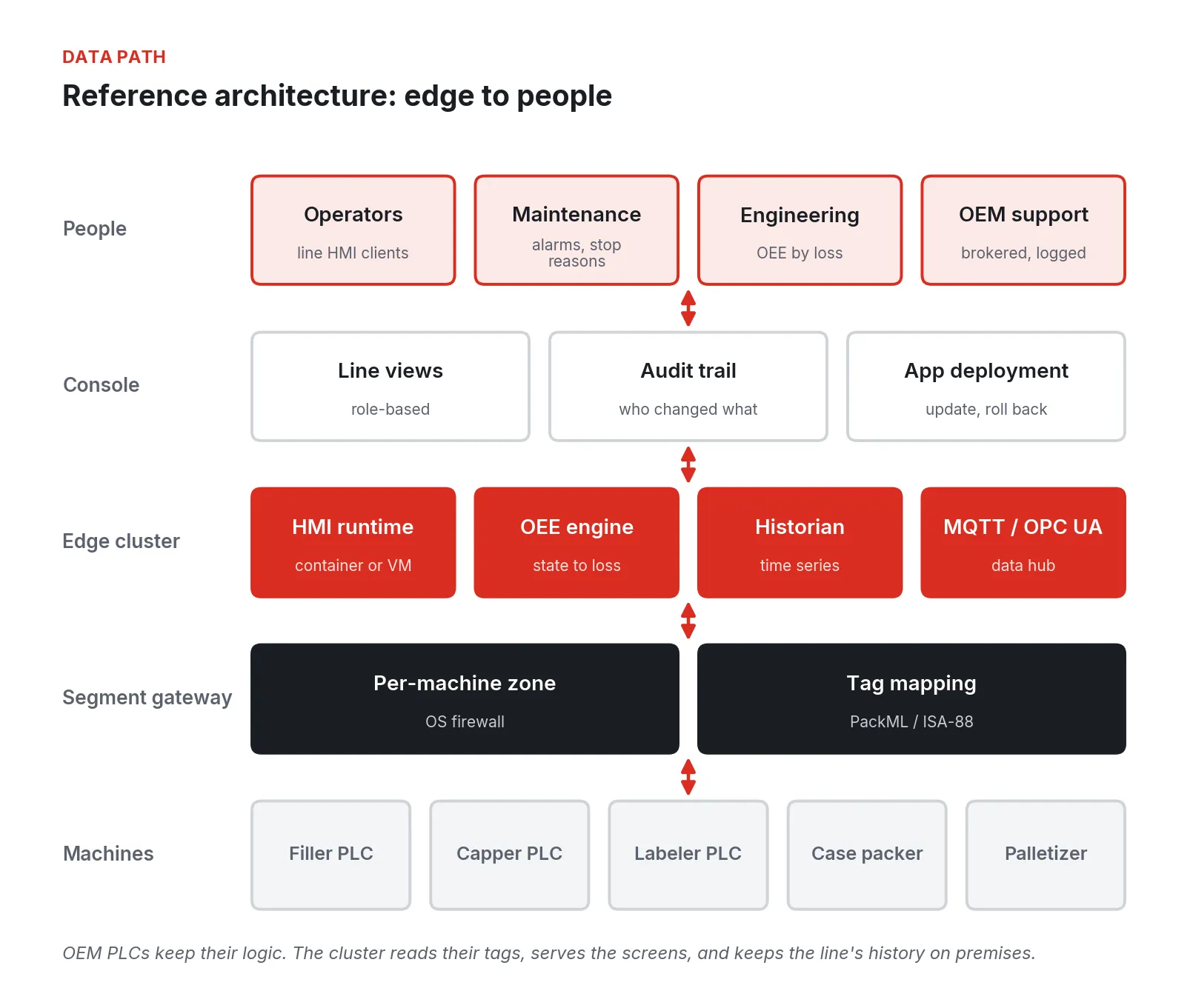
Figure 4. Reference architecture for a consolidated packaging line. OEM PLCs keep their logic; the cluster reads their tags, serves the screens, and keeps history on premises.
A few design choices matter more than the rest.
-
Screens at the machine stay. Operators still need a touchscreen at the filler. What changes is that the screen becomes a client of the cluster instead of a standalone PC with its own Windows image. Dedicated panel HMIs that ship as part of the OEM’s control package (a vendor operator panel wired directly to the PLC) can stay where they are; the PC-based HMIs and SCADA nodes are the target.
-
Safety stays hardwired. E-stops, guard interlocks, and safety PLCs are not part of this work. Nothing in the consolidated architecture sits in a safety function.
-
The cluster has more than one node. If the HMIs for a whole line run on one box and that box fails, the line loses its screens. Two or three nodes, with applications that restart on a surviving node, are the minimum for production use. The PLCs keep running the machines either way, but operators need their screens.
-
Some OEM HMI software needs Windows. Many OEM HMI packages are Windows applications, sometimes tied to a specific version. These can run as full virtual machines on the cluster, which preserves the OEM’s environment while taking the physical PC, its disk, and its hardware failures out of the picture. Others can be rebuilt in a platform-neutral HMI such as Ignition.
-
Data stays local by default. The historian and OEE engine run on the cluster. Anything sent to corporate systems leaves through one defined conduit.
Walking the work, cheapest fixes first
Step 1: Inventory everything with a network port
List every computer on the line: Windows edition and build, HMI and data software, license expiry, backup status, and every remote-access device with its owner and last use. Check each Windows edition against Microsoft’s lifecycle pages; the difference between Windows 10 Pro and Windows 10 IoT Enterprise LTSC 2021 is roughly six years of security updates [11][14]. This step costs only time and usually finds at least one modem nobody knew was there. CISA’s remote-access guide puts the same audit first [16].
Step 2: Take a manual OEE baseline on the constraint
Pick the machine you believe is the constraint (often the filler) and record a week of stops by hand or with a simple logger: start time, end time, reason, and whether it was starved, blocked, or its own fault. Note every changeover from last good case of the old SKU to first good case of the new. This baseline often moves the constraint somewhere unexpected.
Step 3: Read the tags, change nothing
Put the edge cluster on the line and connect it read-only to each OEM PLC. Map each machine’s state, mode, stop reason, counts, and speed into the common model. Where an OEM exposes PackTags over OPC UA, this goes quickly. Where it exposes a proprietary state word, you need the OEM’s tag list and a mapping table, and you should budget engineering time for it. Send the results to a historian and build the first line view: state by machine across a shift, with blocked and starved shown.
Within two to three weeks of good data, most lines show three things: which machine actually limits throughput, which three or four stop reasons account for most minor stops, and how long changeovers really take compared with the schedule.
Step 4: Move one HMI
Choose a machine whose HMI PC is old, out of support, or failing. Move its HMI onto the cluster, either as a VM running the OEM’s own package or as a rebuilt screen set. Put a thin client or panel PC at the machine, and leave the old PC in place, powered and disconnected, as a fallback for the first few weeks. Have operators run on the new screen for at least one full changeover before you call it done. Review the screens against your HMI philosophy while you’re there; ISA-101 covers HMI design across its lifecycle, including a separate technical report on HMI philosophy [23].
Step 5: Replace the remote-access boxes
Once the line’s HMIs and data are on the cluster, each OEM’s service engineer needs a single way in to that OEM’s machine. Work with each OEM to agree on a brokered, logged session to their machine’s zone only, and then disconnect and remove their gateway. Some OEM service agreements name their gateway, so get the change in writing.
Step 6: Finish the line and template it
Move the remaining HMIs, retire the old PCs, and write the tag map, screen standards, zone rules, and backup routine down as a template. On the second line, the remaining work is mostly per-OEM tag mapping.
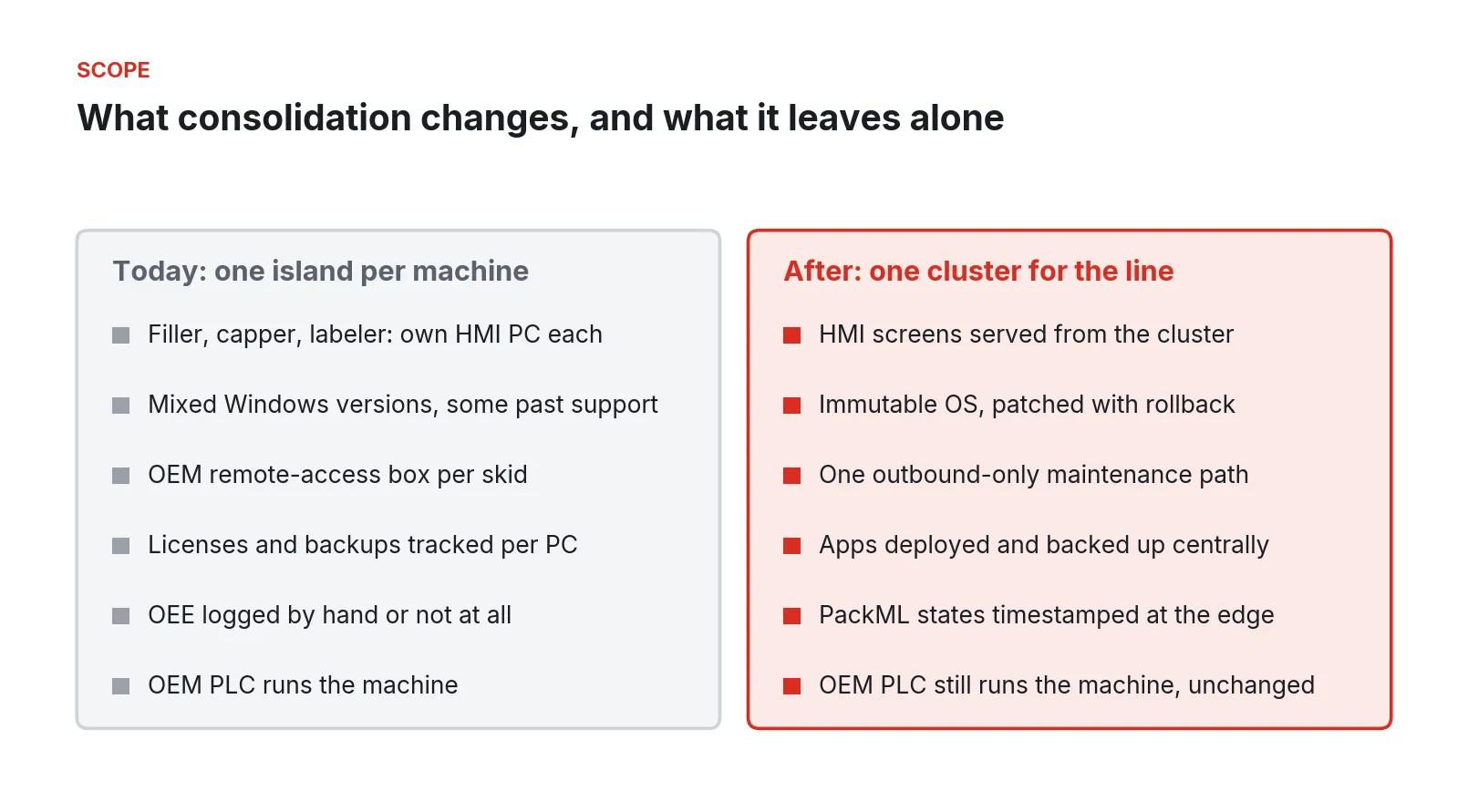
Figure 5. The scope of consolidation. Everything above the OEM PLC moves to the cluster; the machine’s controller, logic, and safety circuit stay as they are.
Where these projects go wrong
-
Treating it as an IT server project. A line HMI is an operator tool. If operators lose a screen they used to tap to clear a jam, minor stops get longer, and the OEE you meant to improve goes down. Involve shift leads before the first screen moves.
-
Mapping tags without the OEM’s documentation. Guessing what bit 7 of a state word means produces OEE numbers that look precise and are wrong. Ask each OEM for its tag list and state definitions, and validate against a stopwatch on the floor.
-
Polling too slowly. A 60-second poll will miss most short stops. Capture state changes at the edge, at sub-second resolution, so the minor stops that drive performance loss show up at all [2].
-
Assuming PackML is there. Familiarity among end users lagged OEMs by a wide margin in the 2016 survey [9], and many brownfield machines predate the standard. Plan a mapping layer for every machine.
-
One box for the whole line. A single server with no redundancy concentrates risk. Build the cluster with spare capacity and test a node failure during a planned stop.
-
Leaving the old remote-access paths live. If the OEM modems stay connected “just in case,” you have added a new path without removing the old ones. Dragos’s finding that most of its incident response cases involved stolen VPN or jump-host credentials is a reason to cut the number of paths [18].
-
Collecting data without a review. PMMI’s 2026 report found that standardized work and digital guidance did more for startup stabilization and changeover losses than added automation complexity [25], and PMMI’s 2025 summit work described legacy machines as isolated data islands, with cost and machine specialization as the main barriers to replacing them [24]. Consolidation removes the islands; a weekly stop-reason review is what turns the data into hours recovered.
Security and compliance
The site’s security and quality programs own compliance. The architecture’s job is to make the required controls practical to apply on a packaging line. The descriptions below cover what the frameworks expect and how a consolidated line supports them.
ISA/IEC 62443: zones and conduits
ISA/IEC 62443 groups assets with shared security requirements into zones and the communication paths between them into conduits, and sets target security levels for each through risk assessment [19]. Practitioner guidance recommends a preliminary segmentation first and a refined one after a cyber process hazard analysis [20]. On a packaging line, each OEM machine is a natural zone: it was designed, programmed, and supported by one vendor. A consolidated design gives each machine its own zone, defines one conduit from that zone to the cluster for tag reads and HMI traffic, and one conduit for OEM remote maintenance. Fewer, documented conduits are easier to assess than a dozen ad hoc ones.
NIST SP 800-82 and CISA guidance
NIST SP 800-82 Revision 3 is the U.S. government’s general guide to OT security architectures, risks, and countermeasures [21]. CISA’s joint guide on remote access software asks organizations to inventory remote-access tools, restrict execution to approved tools, require multifactor authentication for privileged and third-party accounts, and segment networks to limit lateral movement [16]. CISA’s 2026 internet exposure guidance adds that remote access should pass through a centrally managed access solution rather than connect directly to a PLC or HMI, and that integrators’ external connections should be verified [22]. Replacing per-skid modems with one brokered path addresses several of those items at once.
21 CFR Part 11 for regulated packaging
Regulated packaging lines keep electronic records subject to FDA rules. Part 11 section 11.10 requires, among other controls, limiting system access to authorized individuals and keeping secure, computer-generated, time-stamped audit trails of operator entries and actions [10]. A consolidated line gives one place to manage user accounts and one audit trail for HMI and configuration changes, instead of local accounts on a dozen PCs. Validation of the system remains the site’s responsibility.
Phased rollout and what to do Monday
The rollout below is sized for one packaging line of five to eight machines. Your timing will depend mostly on how many OEMs are involved and how quickly each provides tag documentation.
Figure 6. A phased rollout for one line. Read-only data comes first, one HMI moves with its old PC kept as a fallback, and the template carries to the next line.
| Phase | Work | Exit criterion |
|---|---|---|
| Weeks 1 to 3 | Inventory PCs, OS editions, licenses, and remote devices; manual OEE baseline on the constraint | Complete inventory; one week of stop data |
| Weeks 4 to 6 | Cluster installed; read-only tag mapping from every PLC; historian and line view | State, counts, and stop reasons for every machine |
| Weeks 7 to 10 | One HMI moved; operators run a full changeover on it | Old PC disconnected without operator complaints |
| Weeks 11 to 16 | Remaining HMIs moved; OEM remote paths replaced and gateways removed | One maintenance path; no standalone HMI PCs |
| Next | Template documented and applied to the next line | Second line done in less time than the first |
What to do Monday:
- Pick the line you argue about most.
- Walk it with a notepad and list every PC, panel PC, gateway, and modem, with its Windows edition and who owns the password.
- Check each Windows edition against Microsoft’s lifecycle pages and mark the ones past support.
- Put a stopwatch, or a simple logger, on the constraint machine for one week and record every stop with its reason and whether it was starved, blocked, or its own fault.
- Email each OEM on the line and ask for its tag list, its state definitions, and whether it supports PackML or OPC UA.
- Build a one-page table: machine, OS status, remote path, top three stop reasons. Rank by hours lost.
None of this requires a platform or a capital request. It requires one line, a week of honest data, and a table that shows where the hours went.
Fireball Industries is EmberNet’s master integrator. Fireball designs, builds, and supports packaging line consolidation projects: the inventory and baseline, the tag mapping across OEM controllers, the edge cluster on hardware the plant chooses, the HMI moves, and the remote-access cleanup, carried through to the second and third line.
Sources
- Vorne Industries, “World-Class OEE,” OEE.com, accessed September 30, 2026. https://www.oee.com/world-class-oee/
- Vorne Industries, “Six Big Losses,” OEE.com, accessed September 30, 2026. https://www.oee.com/oee-six-big-losses/
- Vorne Industries, “Understanding OEE in Lean Manufacturing,” LeanProduction.com, accessed September 30, 2026. https://www.leanproduction.com/oee/
- OPSI (Jurnal Ilmiah Teknik Industri), “Evaluation of overall equipment effectiveness in the bottling line packaging process: A case study of the beverage company,” vol. 18 no. 2, 2025. https://web.archive.org/web/20260510175155/https://jurnal.upnyk.ac.id/index.php/opsi/article/view/15590
- International Society of Automation, “ANSI/ISA-TR88.00.02-2015, Machine and Unit States: An Implementation Example of ANSI/ISA-88.00.01” (preview), October 26, 2015. https://webstore.ansi.org/preview-pages/ISA/preview_ISA+TR88.00.02-2015.pdf
- Control Engineering, “Updated PackML standard released,” January 26, 2023. https://www.controleng.com/updated-packml-standard-released/
- OPC Foundation, “OPC 30050: OPC UA for PackML,” version 1.01, November 11, 2020. https://reference.opcfoundation.org/specs/OPC-30050
- OPC Foundation, “OPC 30050, Section 6: PackML Data Representation Model,” November 11, 2020. https://reference.opcfoundation.org/specs/OPC-30050/6
- Matt Reynolds, OEM Magazine (PMMI), “Survey says: PackML pull not yet matching push,” February 6, 2016. https://www.oemmagazine.org/technology/oee/article/13274357/survey-says-packml-pull-not-yet-matching-push
- U.S. Code of Federal Regulations, 21 CFR 11.10, “Controls for closed systems,” eCFR, accessed September 30, 2026. https://www.ecfr.gov/current/title-21/chapter-I/subchapter-A/part-11/subpart-B/section-11.10
- Microsoft, “Windows 10 Home and Pro” lifecycle page, accessed September 30, 2026. https://learn.microsoft.com/en-us/lifecycle/products/windows-10-home-and-pro
- Microsoft, “Windows 10 IoT Enterprise” lifecycle page, accessed September 30, 2026. https://learn.microsoft.com/en-us/lifecycle/products/windows-10-iot-enterprise
- Microsoft, “Windows 7” lifecycle page, accessed September 30, 2026. https://learn.microsoft.com/en-us/lifecycle/products/windows-7
- Microsoft, “Windows 10 IoT Enterprise LTSC 2021” lifecycle page, accessed September 30, 2026. https://learn.microsoft.com/en-us/lifecycle/products/windows-10-iot-enterprise-ltsc-2021
- Cybersecurity and Infrastructure Security Agency, “Bad Practices,” accessed September 30, 2026. https://www.cisa.gov/stopransomware/bad-practices
- CISA, NSA, FBI, MS-ISAC, and INCD, “Guide to Securing Remote Access Software,” June 6, 2023. https://www.cisa.gov/sites/default/files/2023-06/Guide%20to%20Securing%20Remote%20Access%20Software_clean%20Final_508c.pdf
- Anna Ribeiro, Industrial Cyber, “Critical vulnerabilities found in Ewon Cosy+ industrial VPN gateways,” August 12, 2024. https://industrialcyber.co/industrial-cyber-attacks/critical-vulnerabilities-found-in-ewon-cosy-industrial-vpn-gateways/
- Dragos, “Dragos 2026 OT Cybersecurity Year in Review Now Available,” February 17, 2026. https://www.dragos.com/blog/dragos-2026-ot-cybersecurity-year-in-review
- Dragos, “ISA/IEC 62443 Explained: OT Cybersecurity Standards,” January 8, 2025, updated August 5, 2025. https://www.dragos.com/blog/isa-iec-62443-concepts
- Maximillian Kon, Automation.com (ISA Global Cybersecurity Alliance), “How to Define Zones and Conduits,” September 1, 2020. https://www.automation.com/article/how-to-define-zones-and-conduits
- Keith Stouffer et al., National Institute of Standards and Technology, “SP 800-82 Rev. 3, Guide to Operational Technology (OT) Security,” September 2023. https://csrc.nist.gov/pubs/sp/800/82/r3/final
- Anna Ribeiro, Industrial Cyber, “CISA issues Internet Exposure Reduction guidance to reduce risks from IT, OT, ICS and industrial systems,” August 27, 2026. https://industrialcyber.co/cisa/cisa-issues-internet-exposure-reduction-guidance-to-reduce-risks-from-it-ot-ics-and-industrial-systems/
- International Society of Automation, “ISA-101 Series of Standards,” accessed September 30, 2026. https://www.isa.org/standards-and-publications/isa-standards/isa-101-standards
- Christopher Smith, OEM Magazine (PMMI), “The Equipment Challenge Hindering End User IT-OT Integration,” August 1, 2025. https://www.oemmagazine.org/pmmi-news/business-intelligence/article/22947030/the-equipment-challenge-hindering-end-user-itot-integration
- PMMI Business Intelligence, “2026 From Complexity to Capability,” May 19, 2026. https://www.pmmi.org/report/2026-from-complexity-to-capability