

At 6:00 a.m. the schedule is right. The scheduler built it yesterday afternoon from the ERP’s planned orders, adjusted it in a spreadsheet for the two machines that are always behind, and printed it for the supervisors. By 7:15 the horizontal mill is down on a spindle alarm. At 8:30 receiving reports that the bar stock for the second job on the lathe cell is on a truck that won’t arrive until tomorrow. At 9:40 sales walks a hot order onto the floor. By 10:00 the printed schedule is a historical document, and the plant is being run by the expediter, the supervisors’ memory, and whoever shouts loudest.
The ERP said the work would fit because its MRP run assumed infinite capacity. The spreadsheet tried to add capacity back in, but it doesn’t know the mill is down, and it can’t re-sequence forty operations across twelve work centers in the four minutes the scheduler has between phone calls. The plant pays for the gap in overtime, extra setups, premium freight, and work-in-process waiting in aisles.
This paper is for the people who live in that gap: production planners and schedulers, plant managers, and the manufacturing engineers who get asked to “fix scheduling.” It covers what a finite-capacity schedule actually needs to know about the floor, where the scheduling logic should run, how to trigger and control rescheduling without making the floor nervous, where AI and machine learning help and where they don’t, and how to roll this out one area at a time.
Start with an honest assessment
Before buying a scheduling tool, answer these about your plant. If you can’t answer one, that is the first finding.
- What fraction of yesterday’s dispatched operations ran in the sequence, on the machine, and in the shift the schedule said?
- When the constraint machine stopped last week, how long did it take for the schedule to reflect it, and who changed it?
- Where does the scheduler learn that a machine is down: from a PLC signal, an andon, a radio call, or by walking past it?
- Do you know your sequence-dependent setup times, by machine, from family to family, or do they live in one setup lead’s head?
- How many versions of the schedule exist right now? Count the whiteboard and the second-shift notebook.
- When a hot order comes in, can you show sales which jobs it will push late before you say yes?
- If the plant’s WAN connection to the ERP or a cloud scheduler went down at 7:00 a.m., could the floor still get a revised dispatch list by 7:30?
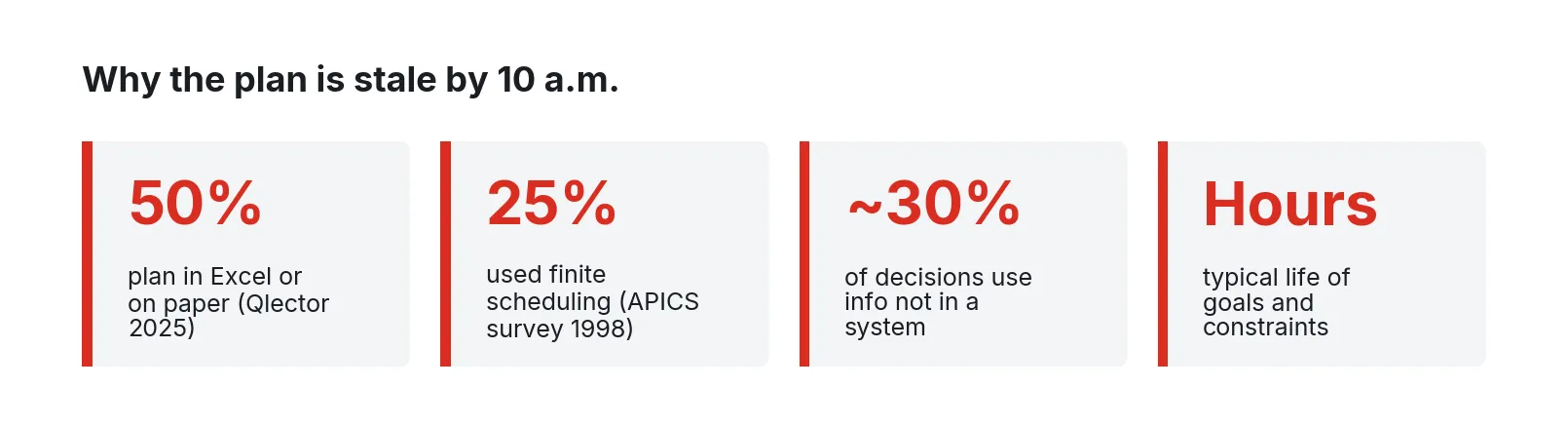
Figure 1. Survey and field-study figures behind the stale-schedule problem. Sources: Qlector production planning survey (2025); LaForge and Craighead (1998) as reported by Herrmann (2010); McKay and Wiers (2006).
Why the ERP plan and the floor drift apart
ISA-95 (IEC 62264) splits the enterprise into levels. Level 4 is business planning and logistics, where the ERP lives. Level 3 is manufacturing operations management: MES, SCADA, and the activities that turn orders into a sequence of work on specific equipment. The standard is mostly about the interface between those two levels [11]. Detailed scheduling falls between them. The ERP’s MRP run decides what to make and roughly when, usually in time buckets and usually without a real view of capacity. Somebody at Level 3 has to decide which job runs next on which machine, and that decision depends on things the ERP doesn’t hold: which machines are running right now, which tooling is mounted, which material is physically staged, and who is qualified on second shift.
The gap is old and well documented. Herrmann, summarizing an APICS survey by LaForge and Craighead, reports that only 25% of responding firms used finite scheduling for any part of their operations, that only 48% of firms with computer-based scheduling received data from other systems automatically, and that 21% entered all scheduling data by hand [2]. A 2025 survey of large manufacturers in Slovenia by Qlector, a planning software vendor, found that every respondent ran an ERP, three in four ran an MES, and half still planned production in Excel or on paper [1].
The field research on what schedulers actually do explains why spreadsheets survive. McKay and Wiers found schedulers carrying more than a hundred heuristics for anticipating problems, keeping several versions of the schedule (one of them, in their words, “a political schedule for the world to see”), and working toward goals and constraints that were rarely stable for more than a few hours [3]. In one study, roughly 30% of scheduling decisions depended on information that wasn’t easily computerized: which crew works well on which job, which operator is out, which customer will actually take a partial shipment [3].
What “schedule adherence” should mean
Schedule adherence is the cleanest measure of whether the schedule is doing its job, and most plants measure it loosely or not at all. A useful definition has three parts: quantity (did the order make its planned quantity), timing (did it finish in its planned window), and sequence (did it run in the planned order). One MES vendor’s published guidance puts solid discrete-manufacturing performance above 85% on a shift-window basis and best-in-class above 92%, and treats anything under 75% as a problem [14]. Treat those as a vendor’s rule of thumb. Track your own number daily, by work center, with a reason for every miss.
What the schedule needs to know about the floor
A finite-capacity schedule is only as good as its model of capacity, and capacity changes minute to minute. The table below lists the signals that matter, where they usually come from, and why each one changes the sequence.
| Signal | Typical source | Why it matters to the schedule |
|---|---|---|
| Machine state (running, idle, down, setup) | PLC run and fault bits, CNC status via MTConnect or OPC UA, stack-light taps | The single biggest source of schedule error is assuming a machine is available when it is down or in setup |
| Downtime reason code | Operator kiosk or HMI pick list | Separates a two-minute jam from a four-hour spindle repair; the repair method depends on expected duration |
| Part count and cycle time | PLC counters, CNC part counters | Shows a job running long before it finishes late, so downstream work can shift early |
| Current job and operation | Operator login at the kiosk, barcode scan of the traveler | Confirms what is actually on the machine, which is often different from the dispatch list |
| Mounted tooling, die, color, or family | PLC recipe number, tool management system, operator entry | Drives sequence-dependent setup time; the next-best job is often the one that needs no changeover |
| Material availability | WMS, ERP inventory, staging-area scans, shortage flag from the kiosk | A job without material at the machine can’t start no matter what the schedule says |
| Labor and qualifications | Time clock, shift roster, skills matrix | A work center without a qualified operator has no capacity this shift |
| Orders, routings, due dates, priorities | ERP and MRP (Level 4) | The demand side of the problem; hot-order flags should arrive as events the scheduler can act on |
| Actual setup and run times (history) | Collected from all of the above over weeks | Replaces routing standards that were set years ago and never revisited |
Sequence-dependent setups
In many shops the order of jobs changes the total time more than any other choice. Light to dark resin, one die family to another: the changeover depends on what ran before. Allahverdi’s 2015 survey of roughly 500 papers on scheduling with setup times notes that most scheduling literature ignores setups, while reporting cases where setup activity consumed 20 to 50% of available capacity in printed circuit board assembly [5]. The practical fix is a setup matrix: from-family by to-family, by machine, filled from measured changeovers.
Machine state from the controller
Machine state should come from the machine. PLC run and fault bits, CNC execution status, or a current transducer on the spindle motor will tell you a machine is running more reliably than a person remembering to press a button. Reason codes still need a person, and the kiosk that asks for them should take one touch. Reading an existing PLC or OEM controller is integration work on its tags, done without changing the control program.
Where the scheduling logic should run
The scheduler belongs at the plant edge because its data originates on the floor, its decisions have to be made in minutes, and the floor has to keep working when the connection to corporate systems doesn’t.
A remote optimizer, whether in a corporate data center or a public cloud, adds a round trip to every reschedule: floor data goes up, a solution comes down, and the plant waits on both. When the WAN drops, the plant loses its data path and its scheduler at once. Scheduling at the edge keeps the inputs, the solver, and the dispatch lists on the same local network as the machines.
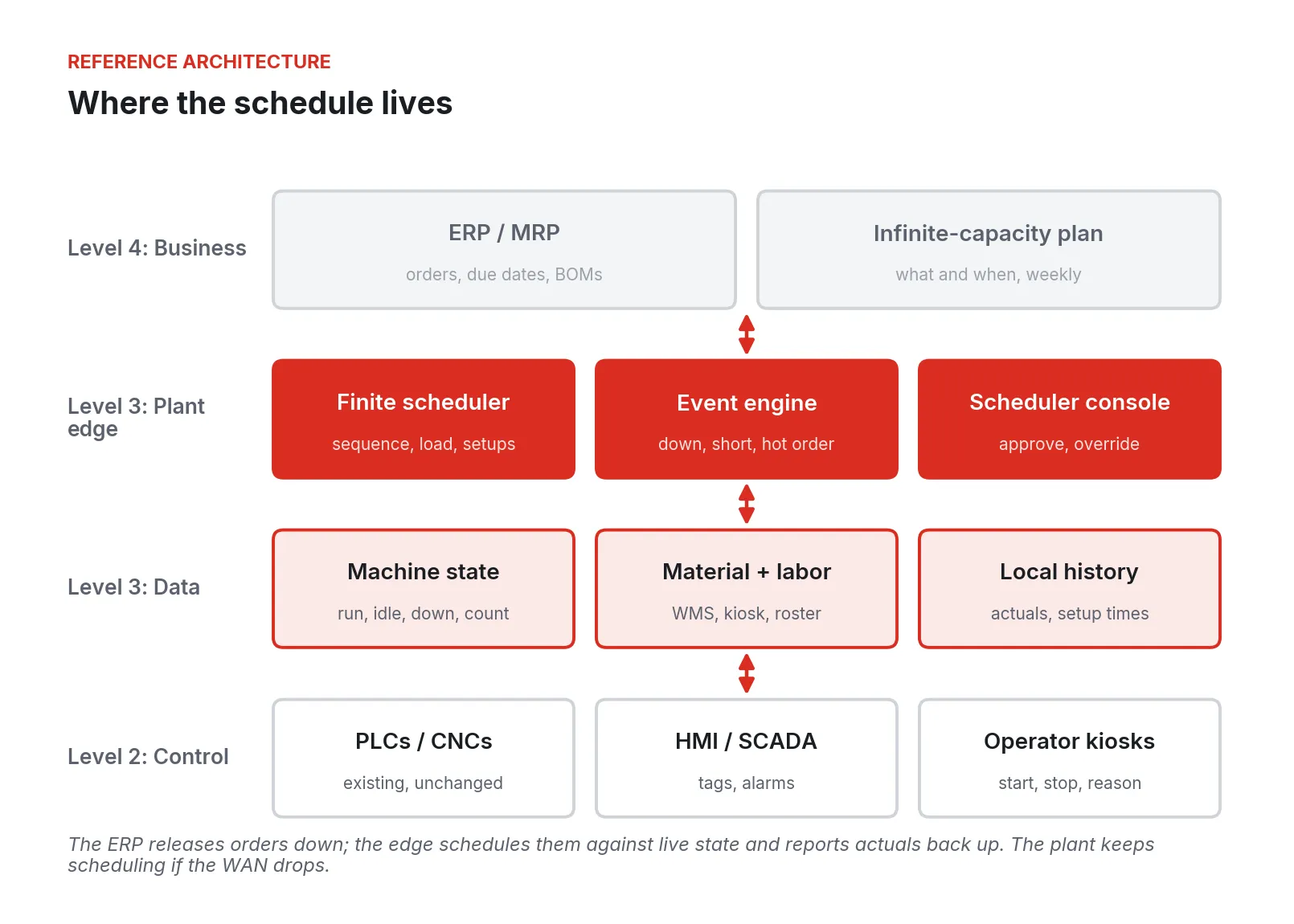
Figure 2. Reference architecture. The ERP releases orders and due dates down from Level 4; finite scheduling, event handling, and the scheduler’s console run at the plant edge against live Level 2 data; actuals flow back up.
In Figure 2, the ERP stays the system of record for demand, inventory, and costing, and releases orders, routings, and due dates on its normal cycle. At the edge, a data layer collects machine state, counts, reason codes, and material and labor events, and keeps a local history of actual setup and run times. A finite-capacity scheduler sequences each work center against real availability, the setup matrix, and due dates; an event engine proposes repairs; the scheduler approves them; dispatch lists update at each work center. Completions, scrap, and downtime flow back to the ERP. If the WAN goes down, everything at the edge keeps running, and actuals are buffered until the link returns.
Constraint-based, heuristic, and learned scheduling
Scheduling methods fall into three families, and a practical system usually uses all three.
Dispatching rules and heuristics
Dispatching rules pick the next job when a machine comes free: earliest due date, shortest processing time, critical ratio, or “same family as what’s mounted.” They are fast and transparent, but myopic: good local choices can add up to a poor global schedule. Vieira, Herrmann, and Lin call this dynamic scheduling, where no full schedule is generated and decisions happen at the machine [4].
Constraint-based and mathematical optimization
Constraint programming and mixed-integer models build a full schedule that respects capacity, precedence, setups, labor, and material, and optimizes a stated objective such as tardiness, makespan, or total setup time. Figueroa, Poler, and Andres built a mixed-integer model for a job shop that reschedules after machine breakdowns and material supply delays, and changes only the parts of the plan that need to change to keep the rest stable [9]. Psarommatis and co-authors tested an event-management heuristic on a PCB production case: decisions in under one second against 45 minutes for an optimization method, and 21.1% better on average than five other rescheduling policies [8]. The lesson for a plant: use the solver for the full overnight or per-shift build, and use fast repair heuristics for events during the shift.
Machine learning and reinforcement learning
Reinforcement learning (RL) for machine scheduling is not new: one review covered 80 papers from 1995 to 2020 [15]. A 2025 review in the Journal of Intelligent Manufacturing describes RL’s promise for dynamic job shops with sudden job arrivals and equipment failures, and lists the open problems: scalability, interpretability, data availability, and the lack of standard performance measures [7]. Espinaco and Henning, reviewing industrial rescheduling approaches, found that practical application remains limited and that existing systems lack adequate rescheduling functions [10].
The useful near-term role for machine learning is narrower and easier to trust:
- Predicting actual run and setup times from history, by part, machine, and operator, to replace stale routing standards.
- Predicting how long a downtime event will last from its reason code and history, so the repair method fits the outage.
- Learning which dispatching rule performs best for a given state of the shop, and proposing it to the scheduler.
- Flagging orders likely to finish late before they do.
Rescheduling without making the floor nervous
Vieira, Herrmann, and Lin’s framework is the clearest guide to rescheduling [4]. They distinguish three policies: periodic (revise on a fixed interval, such as each shift), event-driven (revise when something happens), and hybrid (periodic, plus event triggers for major disruptions). They describe three repair methods: right-shift (push everything after the disruption later by the length of the outage), partial or affected-operations rescheduling (re-plan only the jobs the disruption touched), and complete regeneration (re-plan everything not yet started). And they name the cost of doing it too often: nervousness, the instability that comes from changing the schedule so often that nobody on the floor can follow it.
The practical design is a hybrid. Build a full schedule at a fixed point, usually before each shift. During the shift, let defined events trigger a repair. Use right-shift for short stops, affected-operations repair for longer outages and shortages, and full regeneration only when the scheduler asks for it. Freeze the next few jobs at each work center so a machine that is already set up doesn’t get its job pulled.
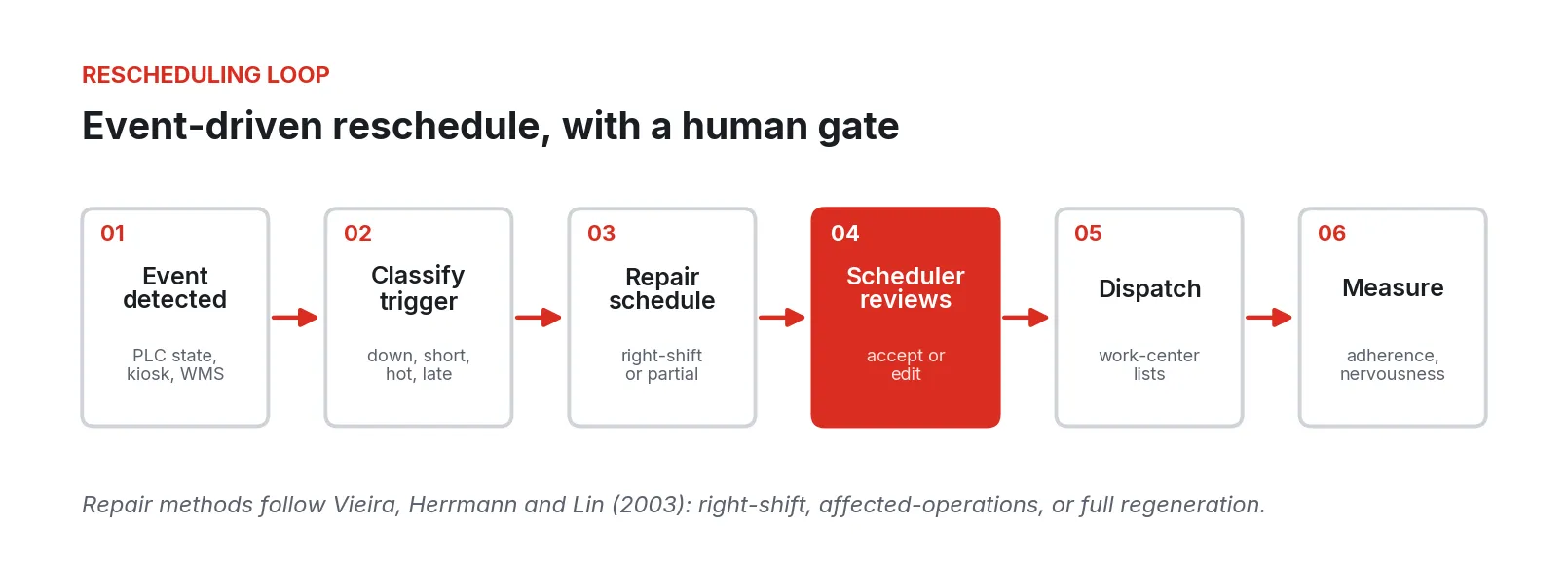
Figure 3. The event-driven rescheduling loop. Repair methods follow Vieira, Herrmann, and Lin (2003). The scheduler’s review step is the gate between a proposal and the floor.
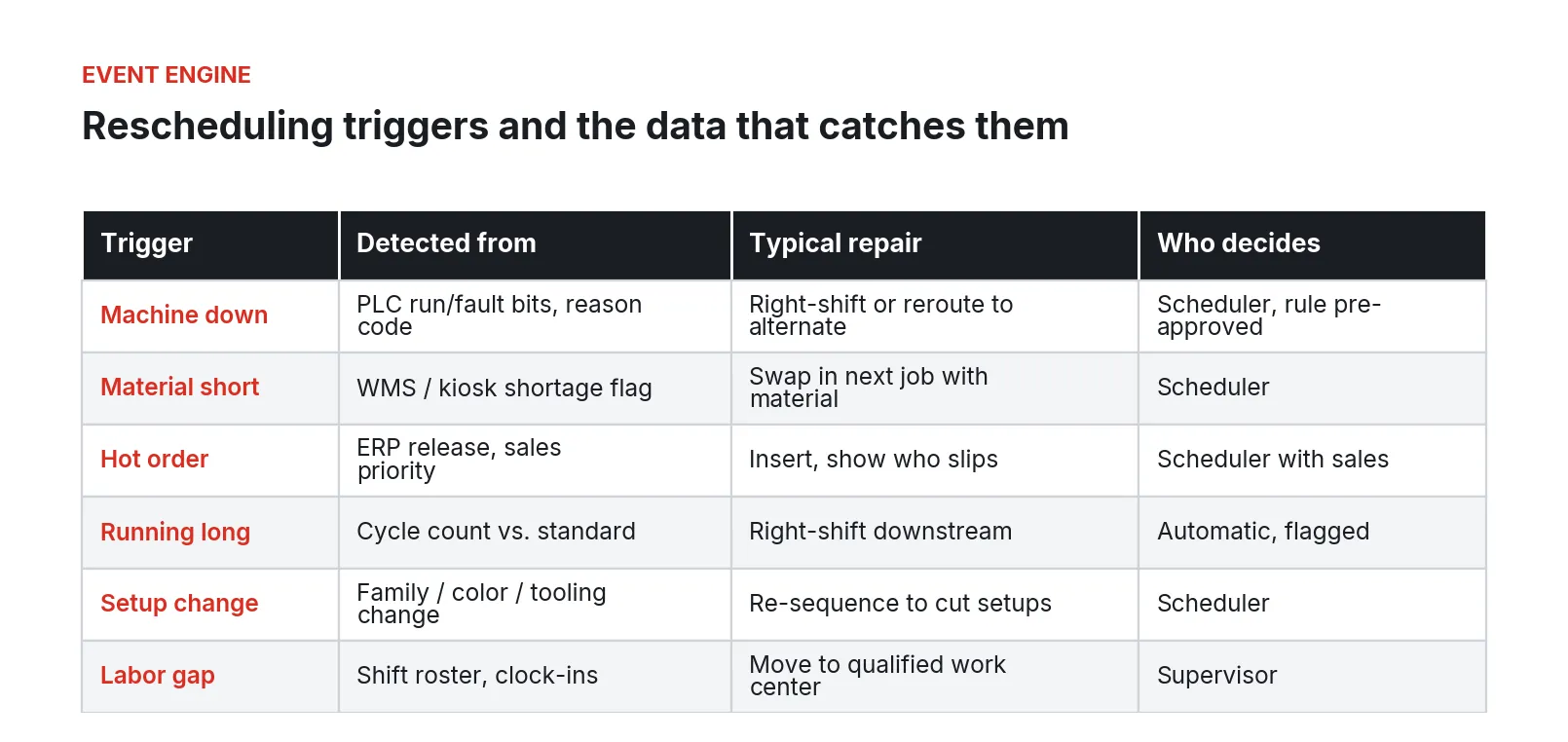
Figure 4. Common rescheduling triggers, the floor data that detects each one, a typical repair, and who approves it. The pairings are illustrative design choices drawn from the triggers named in Vieira, Herrmann, and Lin (2003) and Figueroa, Poler, and Andres (2024).
Keep the scheduler in charge
The review step in Figure 3 matters most. McKay and Wiers’ finding that roughly 30% of decisions rest on information that isn’t in any system means a fully automatic reschedule will be wrong in ways the scheduler can see and the software can’t [3]. Herrmann argues the same: systems should support the scheduler’s judgment on uncertainty and bottlenecks [2].
In practice that means:
- Every proposed repair shows the scheduler what changes: which jobs move, which machines change, which orders go late and by how much.
- The scheduler can accept, edit, or reject it. Edits are kept as constraints for the next build, so the system learns that this job doesn’t run on that machine on second shift.
- Small, pre-approved repairs (a five-minute right-shift for a jam) go through automatically and are logged so the scheduler can see them.
- Hot orders always go to a person. The system’s job is to show the cost of inserting the order so the scheduler and sales can make the call with facts.
The 10 a.m. problem, worked through
Consider the opening morning again. At 7:15 the mill’s PLC fault bit and the operator’s reason code reach the edge within seconds. The event engine estimates a three-hour outage from past spindle events and proposes a repair: two jobs move to the second horizontal mill, one right-shifts to the afternoon, one order goes four hours late against a day of slack. The scheduler swaps the two moved jobs because she knows which operator is faster on which, and approves. At 8:30 the shortage flag pulls the lathe job and brings forward the next job with material staged. At 9:40 the hot order goes in after the scheduler and sales see which two jobs it pushes.
Where these projects go wrong
1. Starting with the algorithm. Teams pick a solver or an AI vendor before they can say whether a machine is running. A good algorithm fed a bad capacity model produces a confident, wrong schedule.
2. Trusting routing standards. Run and setup times in the ERP were often set at product launch and never updated. Herrmann’s survey figures on manual data entry describe how often the data feeding schedulers is typed in rather than measured [2].
3. Ignoring setups. If the schedule treats changeovers as a constant, it can’t find the sequence that saves them, and the floor will re-sequence by hand [5].
4. Over-rescheduling. Every event triggers a full regeneration, the dispatch list changes every twenty minutes, and the floor stops looking at it. This is the nervousness Vieira, Herrmann, and Lin warn about [4]. Freeze windows and repair-first policies prevent it.
5. Cutting the scheduler out. A system that publishes sequences without review gets overridden informally, and the plant ends up with two schedules again, the system’s and the real one [3].
6. Depending on the WAN. A cloud-hosted scheduler with no local fallback means the first network outage puts the plant back on paper, and the floor learns not to rely on the system.
7. No adherence measure. Without a daily adherence number by work center, nobody can tell whether the new system is helping, and the project is judged on anecdotes.
The benefits are real when these are avoided. MESA International’s field surveys of MES users in the 1990s, a small sample across seven industries, reported average reductions of 35% in manufacturing cycle time, 32% in work in process, and 22% in lead time [6]. They are self-reported, and MES covers more than scheduling, but the summary credits accurate, real-time data for better decisions [6].
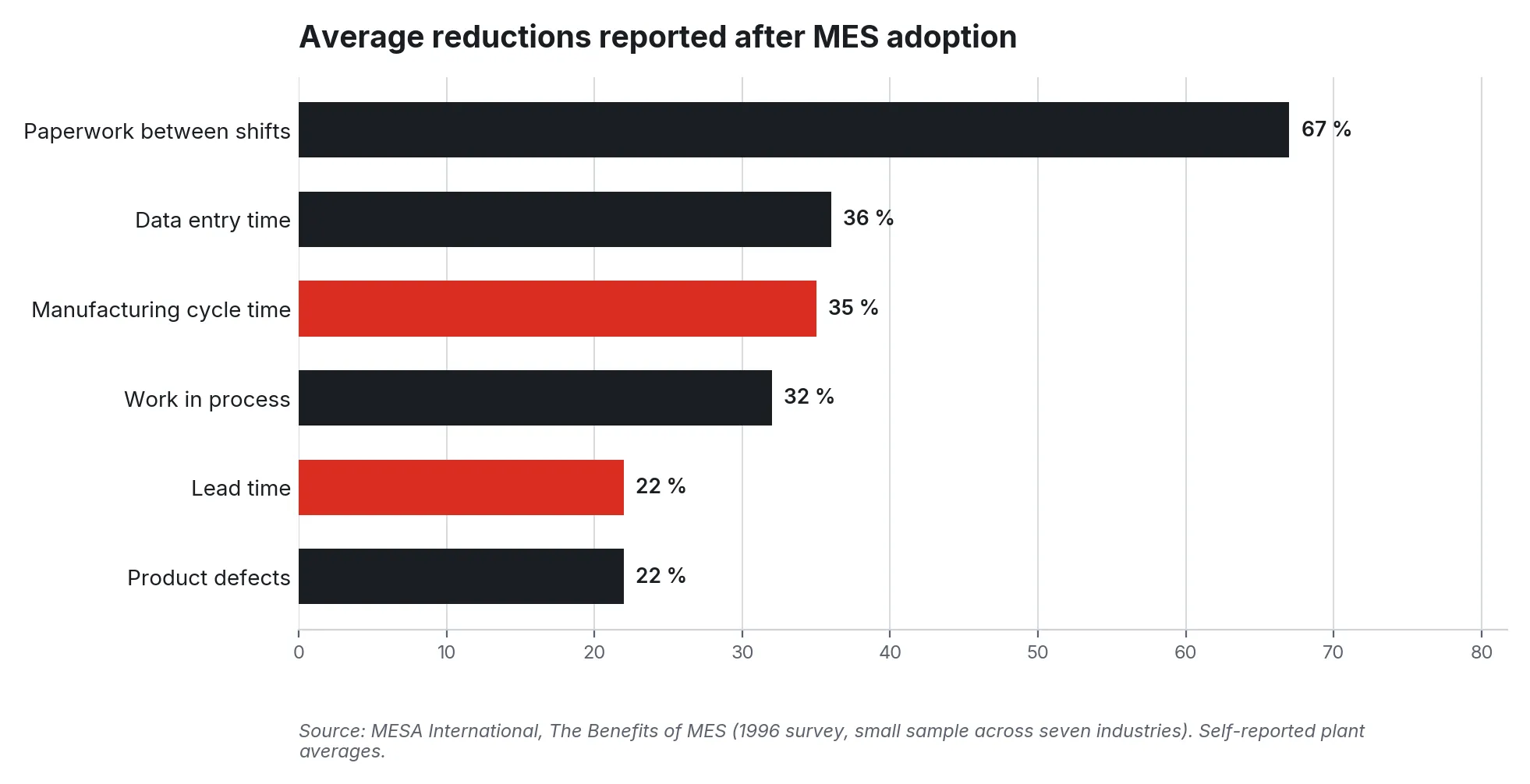
Figure 5. Average reductions reported by MES users in MESA International’s 1996 field survey. Self-reported plant averages from a small sample across seven industries.
Security and compliance
Edge scheduling touches PLCs and CNC controllers, so it falls under the plant’s industrial control system security program.
ISA/IEC 62443 organizes an industrial network into zones (assets that share the same security requirements) and conduits (the communication paths between zones), each with a target security level set by risk assessment [12]. For an edge scheduling system, that typically means:
- The machine controllers sit in their own zone. The edge node that reads their tags is the only conduit to them, and it reads only the tags it needs.
- The scheduling applications and the data history sit in a Level 3 zone, separate from both the controllers and the business network.
- The link to the ERP is its own conduit, carrying order releases down and actuals up, with nothing else allowed through.
- Remote access for support goes through a defined, logged path with no standing inbound openings in the plant firewall.
NIST SP 800-82 Revision 3, the US government’s guide to operational technology security, covers the same ground from a risk-management angle: OT system architectures, common threats and vulnerabilities, and the countermeasures that reduce risk without compromising the safety and reliability these systems exist to provide [13].
Two points are specific to scheduling. First, the schedule is a write path into the plant’s work: a tampered dispatch list can run the wrong job on the wrong machine. Approvals, changes, and overrides should be recorded with who made them and when. Second, the edge system should read from controllers. Writing setpoints or recipes back to a PLC from a scheduling application is a control-system change and belongs under the plant’s management-of-change process.
Compliance belongs to the plant’s security program; the architecture makes zones, conduits, access, and audit records inspectable.
A phased rollout
Figure 6. A phased rollout, from measuring the gap on one constraint to scaling across areas and sites.
1. Weeks 1 to 4: Measure the gap. Pick the area you argue about most and find its constraint machine. Capture state and counts, add a reason-code kiosk, measure daily adherence and actual setups. Change nothing else.
2. Weeks 5 to 8: Build a finite board for one area. Load real capacity and the setup matrix, generate each shift’s schedule against live state, and compare adherence with the baseline. The scheduler approves everything.
3. Weeks 9 to 14: Add event triggers. Wire machine-down, material-short, running-long, and hot-order events to proposed repairs. Set freeze windows. Track how often schedules change to catch nervousness early.
4. Months 4 to 6: Optimize and learn. Add a constraint solver for the shift build, and learned run-time and downtime-duration estimates from the history you have been collecting. Keep the scheduler’s review step.
5. Month 6 onward: Scale. Extend to the next area, close the loop with actuals back to the ERP, and repeat at other sites using the same pattern.
What to do Monday
Pick the area you argue about most. Find the one machine everything waits on. Put a signal on it, from the PLC if you can or from the stack light if you can’t, and leave it for two weeks. Ask the operator for a reason every time it stops. Every afternoon, compare what ran against what the schedule said, in quantity, timing, and sequence, and write down why each miss happened.
At the end of two weeks you will have three things most plants don’t: a real adherence number, a list of the reasons the schedule fails ranked by hours lost, and a first set of measured setup times. That is the specification for whatever scheduling system comes next, and it costs one sensor, one kiosk, and the discipline to keep the log.
Fireball Industries is EmberNet’s master integrator. Fireball designs, builds, and supports edge scheduling and production coordination systems on EmberNet: connecting to existing PLCs, CNCs, MES, and ERP, putting the scheduler and the data it needs on site, and staying with the plant through rollout, area by area.
Sources
- Qlector (planning software vendor). “How Leading Manufacturers Plan Production: 50% Still Depend on Excel and Paper.” Survey conducted June to September 2025. https://www.qlector.com/resources/insights/how-leading-manufacturers-plan-production-50-still-depend-on-excel-and-paper
- Herrmann, J. W. “The Perspectives of Taylor, Gantt, and Johnson: How to Improve Production Scheduling.” International Journal of Operations and Quantitative Management 16(3), 243 to 254, September 2010. Reports LaForge, R. L. and Craighead, C. W., Manufacturing Scheduling and Supply Chain Integration: A Survey of Current Practice, APICS, 1998. https://user.eng.umd.edu/~jwh2/papers/Herrmann.IJOQM.2010.pdf
- McKay, K. N. and Wiers, V. C. S. “The Human Factor in Planning and Scheduling.” In J. W. Herrmann (ed.), Handbook of Production Scheduling, Springer, 2006. https://ftp.idu.ac.id/wp-content/uploads/ebook/ip/BUKU%20SCHEDULING/Handbook%20of%20Production%20Scheduling.pdf
- Vieira, G. E., Herrmann, J. W. and Lin, E. “Rescheduling Manufacturing Systems: A Framework of Strategies, Policies, and Methods.” Journal of Scheduling 6(1), 39 to 62, 2003. https://link.springer.com/article/10.1023/A:1022235519958 (preprint: https://isr.umd.edu/Labs/CIM/projects/jos-rescheduling.pdf)
- Allahverdi, A. “The Third Comprehensive Survey on Scheduling Problems with Setup Times/Costs.” European Journal of Operational Research 246(2), 345 to 378, 2015. https://www.sciencedirect.com/science/article/abs/pii/S0377221715002763
- MESA International. “The Benefits of MES: A Report from the Field.” Results of member surveys conducted in 1993 and 1996. https://silo.tips/download/the-benefits-of-mes-from-the-field
- Ngwu, C., Liu, Y. and Wu, R. “Reinforcement Learning in Dynamic Job Shop Scheduling: A Comprehensive Review of AI-Driven Approaches in Modern Manufacturing.” Journal of Intelligent Manufacturing, March 2025. https://link.springer.com/article/10.1007/s10845-025-02585-6
- Psarommatis, F., Martiriggiano, G., Zheng, X. and Kiritsis, D. “A Generic Methodology for Calculating Rescheduling Time for Multiple Unexpected Events in the Era of Zero Defect Manufacturing.” Frontiers in Mechanical Engineering 7, 2021. https://www.frontiersin.org/journals/mechanical-engineering/articles/10.3389/fmech.2021.646507/full
- Figueroa, A. J., Poler, R. and Andres, B. “Adaptive Production Rescheduling System for Managing Unforeseen Disruptions.” Mathematics 12(22), 3478, 2024. https://www.mdpi.com/2227-7390/12/22/3478
- Espinaco, F. and Henning, G. P. “Industrial Rescheduling Approaches: Where Are We and What Is Missing?” Proceedings of the 11th International Conference on Production Research, Americas (ICPR 2022), Springer, 2023. https://link.springer.com/chapter/10.1007/978-3-031-36121-0_58
- International Society of Automation. “ISA-95 Series of Standards: Enterprise-Control System Integration.” Accessed September 2026. https://www.isa.org/standards-and-publications/isa-standards/isa-95-standard
- Kon, M. (WisePlant). “How to Define Zones and Conduits.” ISA Global Cybersecurity Alliance / Automation.com, September 1, 2020. https://gca.isa.org/blog/how-to-define-zones-and-conduits
- Stouffer, K. et al. “Guide to Operational Technology (OT) Security.” NIST Special Publication 800-82 Revision 3, September 2023. https://csrc.nist.gov/pubs/sp/800/82/r3/final
- SYMESTIC (MES software vendor). “Schedule Adherence: Formula, OEE Trap and Sequence Rules.” Accessed September 2026. https://www.symestic.com/en-us/what-is/schedule-adherence
- Kayhan, B. M. and Yildiz, G. “Reinforcement Learning Applications to Machine Scheduling Problems: A Comprehensive Literature Review.” Journal of Intelligent Manufacturing, October 2021. https://link.springer.com/article/10.1007/s10845-021-01847-3