

It is 2:40 on a Sunday morning and the case packer on Line 3 has stopped on fault 214. The HMI says “Servo axis 2 following error.” The tech on shift has been here eleven months. The person who would know, the one who has seen 214 a dozen times and remembers that it was the coupling set screw on the infeed the last three times, retired in the spring. The OEM manual is a 600-page PDF on a shared drive the tablet cannot reach from the floor. The CMMS has four work orders that mention the packer and “servo,” written as “fixed it,” “adj. infeed,” “see Mike,” and “replaced per OEM.” So the tech starts at the top: checks the drive, reseats the encoder cable, calls the on-call supervisor, waits.
The plant already knows the answer. It is in a closed work order from two years ago, on page 412 of the manual, and in the head of someone who is now fishing. None of it is reachable at 2:40 a.m., in front of the machine.
That gap has a cost. Siemens’ 2024 survey of the world’s 500 largest companies put unplanned downtime at roughly $1.4 trillion a year, about 11 percent of their revenue, and found average recovery time per incident rising from 49 to 81 minutes since 2019. Siemens attributes part of that increase to skilled maintenance people leaving after the pandemic and taking their knowledge with them [1][2]. Deloitte and The Manufacturing Institute estimate US manufacturing will need about 3.8 million new workers between 2024 and 2033, and that around 1.9 million of those jobs could go unfilled [3]. The same study expects maintenance technician roles in manufacturing, about 270,000 people in 2022, to grow as much as 16 percent by 2032 [3][4]. The Bureau of Labor Statistics expects about 51,900 openings a year for industrial machinery mechanics, maintenance workers, and millwrights, many of them replacing people who retire or leave the trade [5].
This paper is about a specific tool for that specific gap: a conversational assistant that answers a maintenance tech’s questions from the plant’s own records, shows where each answer came from, and runs on site whether or not the internet is up. Most of the early work, especially cleaning up the records, pays off whether or not you ever deploy one.
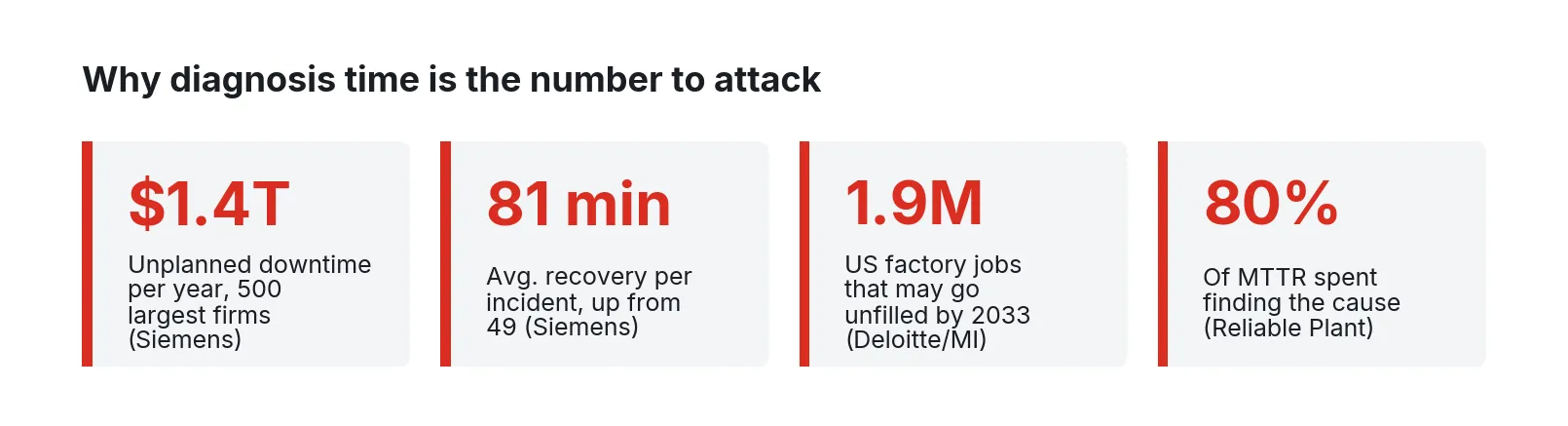
Figure 1. Downtime cost, recovery time, and workforce figures from Siemens (2024), Deloitte and The Manufacturing Institute (2024), and Reliable Plant.
Start with a self-check
Before anyone picks a model or a vendor, answer these about your own site. Use one line you know well.
- For the last 20 unplanned stops on that line, can you split the repair time into diagnosis, isolation, waiting for parts, wrenching, and testing? If not, you do not yet know which part of MTTR an assistant would shorten.
- If you pull every work order on that line from the past three years, what fraction has a usable failure description, cause, and action? What fraction says “fixed,” “adjusted,” or names a person?
- Where are the OEM manuals, electrical prints, and PLC fault lists for that line? Are they searchable text, scanned images, or binders in the crib? Which revision matches the machine on the floor?
- When the HMI shows a fault code, how does a tech get from the code to the procedure? Is the fault text in the HMI the same as the text in the manual?
- Who are the two or three people whose phones ring when that line goes down at night? How many years until they leave?
- Can a tablet on the floor reach any of this without a cloud connection? What happens to it when the WAN goes down?
- When a tech finds a new fix, where does it get written down, and how would the next tech on a different shift find it?
Most plants answer these badly, and that is normal. The assistant is only as good as what it can retrieve, so questions 2, 3, and 7 are the real project.
Where the repair minutes go
Mean time to repair is one number made of very different activities. A trade figure repeated widely in reliability circles holds that about 80 percent of MTTR goes to working out what caused the failure [6]. Treat it as a rule of thumb and measure your own split; the shape is familiar: short wrench time, long hunting, parts waiting as the wildcard.
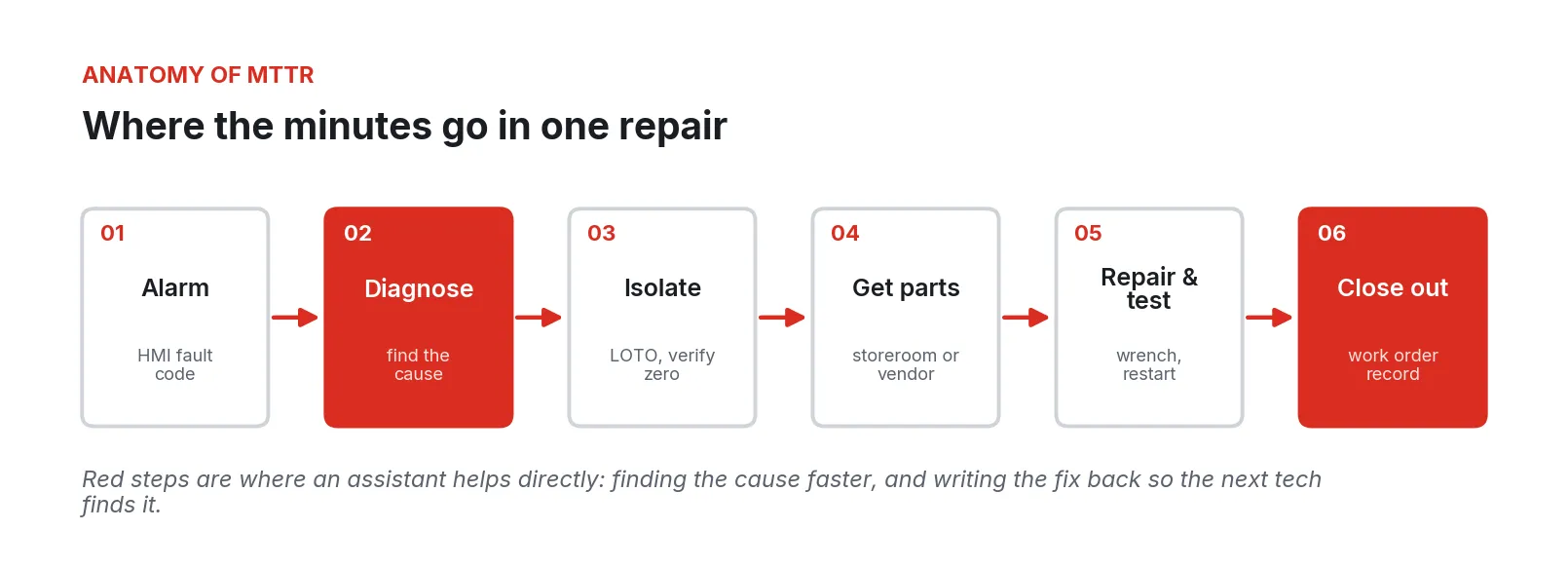
Figure 2. The steps of one repair. An assistant helps most in diagnosis and in capturing the fix at close-out; isolation, parts logistics, and the repair itself stay with people and procedures.
Each step has a different lever:
1. Diagnosis. The fault code’s meaning, the likely causes ranked by what has happened on this asset, and the relevant drawing.
2. Isolation. Lockout/tagout follows the written energy control procedure. An assistant can show it; it never replaces it.
3. Parts. Part number, bin, and on-hand count before the walk to the crib; if there is no spare, the tech calls for help an hour sooner.
4. Repair and test. Torque values, settings, and restart checks from the manual, cited to the page.
5. Close-out. The step most often skipped. A structured work order entry drafted from what the tech said and did turns one person’s fix into the plant’s knowledge.
What the assistant needs to read
A maintenance assistant is a search engine with a language model on top. Its value comes from the sources it can search and how well they are prepared. The table lists the sources worth connecting, roughly in order of payoff.
| Source | Where it lives today | What the assistant uses it for | Typical cleanup needed |
|---|---|---|---|
| CMMS work order history | Maximo, eMaint, Fiix, UpKeep, SAP PM, or similar; often exported to CSV | “What fixed this last time on this asset?” Failure frequency, past causes, who worked it | Map asset IDs; tag free-text with failure mode, cause, and action; drop duplicates |
| OEM manuals and service bulletins | PDFs on a share drive, vendor portals, paper binders | Fault code meanings, troubleshooting trees, settings, torque values, part numbers | OCR scanned pages; confirm revision matches installed machine; keep page numbers |
| Electrical prints and P&IDs | PDF or CAD, sometimes only paper | Wire numbers, I/O addresses, terminal locations, interlocks | Index sheet numbers and device tags so a question can land on the right sheet |
| PLC and HMI fault lists | PLC project, HMI alarm database, OEM fault tables | Map the code on the screen to the text in the manual | Export alarm tables; reconcile HMI text with manual text |
| Site SOPs and LOTO procedures | Document control system | Point to the governing procedure; never paraphrase energy isolation steps | Confirm the current approved revision is the one indexed |
| Parts inventory | CMMS stores module or ERP | Part number, bin location, on-hand quantity, lead time | Link parts to assets (the BOM is often incomplete) |
| Alarm and event history | HMI, SCADA, or historian | Sequence of events before the stop; how often this code has fired | Read-only export; align timestamps |
| Live tag snapshot | PLC through a gateway | Current state of the axis, valve, or interlock the tech is asking about | Read-only, scoped to the asset in question |
The CMMS history is the most valuable source and the dirtiest. NIST researchers working on maintenance text describe work orders as a large share of the data collected over an asset’s life, much of it unusable by tools built for ordinary language, because technicians write in shorthand, misspell part names, and use local nicknames [7]. “Repl brg DE mtr, chkd algn” means something precise to a millwright and very little to a general-purpose model. Two practical consequences follow. First, a short local glossary (abbreviations, asset nicknames, the names people actually call machines) improves retrieval more than a bigger model does. Second, it pays to tag past work orders with a consistent failure-mode vocabulary. ISO 14224, written for oil, gas, and petrochemical equipment, is a useful pattern for that vocabulary even outside those industries, because it separates failure mode, failure mechanism, and cause in a way that makes records comparable across assets [18].
Reference architecture
The design that works in plants keeps the assistant close to the floor, reading from plant systems and never writing to controls.
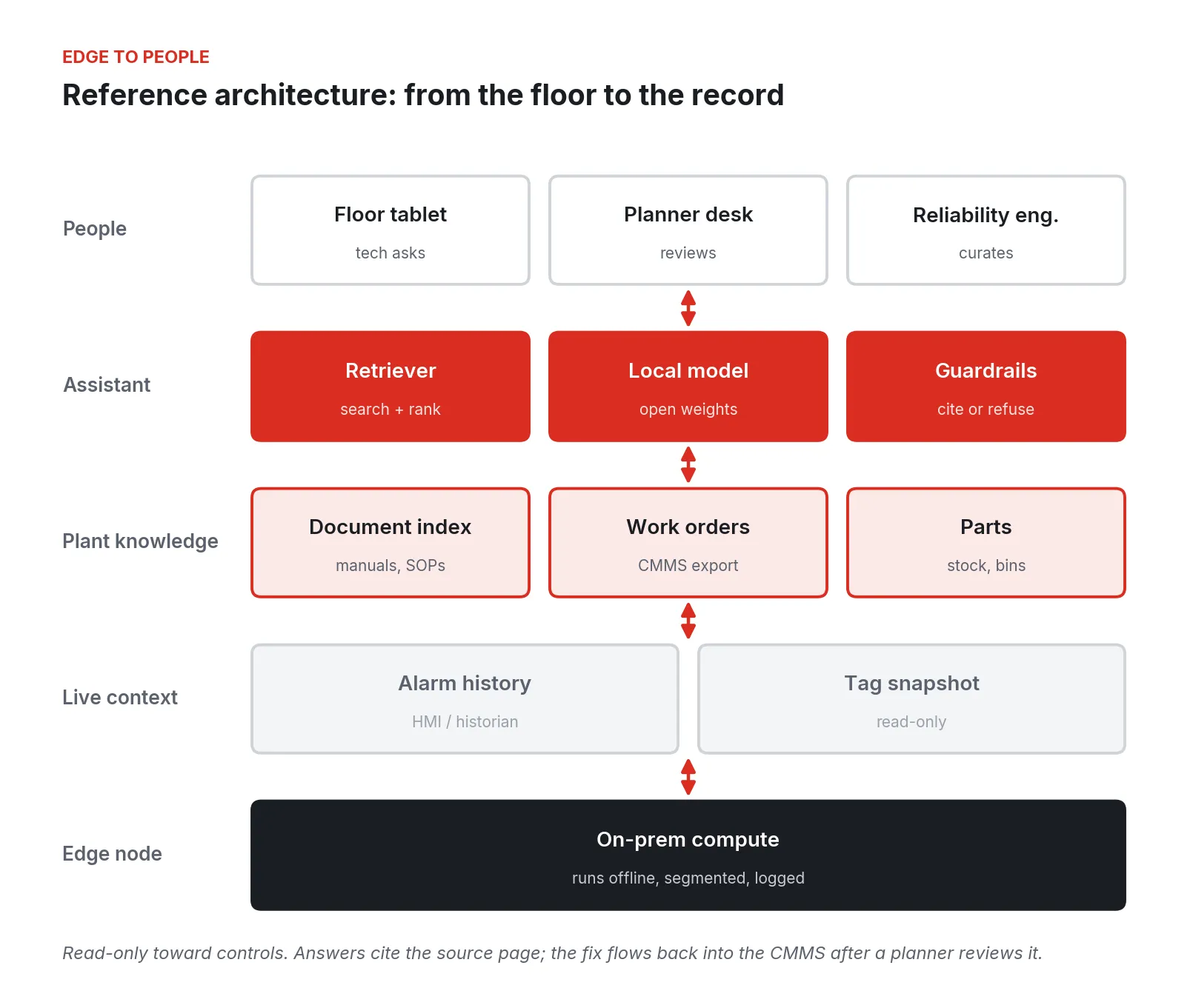
Figure 3. Reference architecture. The assistant runs on site, reads plant knowledge and live context, cites its sources, and sends captured fixes to a planner for review before they enter the CMMS.
From the bottom up:
1. Edge compute on site. A server or industrial PC in the plant runs the index, retrieval, the language model, and logging, and keeps working when the WAN does not. Model size drives hardware.
2. Live context, read-only. Alarm history from the HMI or historian and, on request, a snapshot of a few tags for the asset. No write path to any controller.
3. Plant knowledge. A document index built from manuals, prints, SOPs, and fault lists, with page and sheet numbers preserved; a structured copy of work order history; and the parts list. Access rules follow the source: if a tech cannot open a document in the document control system, the assistant should not quote it to that tech.
4. The assistant itself. A retriever that finds the most relevant passages, a language model that writes an answer only from those passages, and guardrails that check for a citation, refuse when retrieval is weak, and route safety-critical questions to the governing procedure.
5. People. Techs ask from a tablet at the line. Planners review captured fixes. A reliability engineer owns the glossary, the question log, and what gets indexed.
How a question becomes a cited answer
The technique is retrieval-augmented generation, introduced in the research literature in 2020 as a way to pair a language model with a searchable document store so answers can be traced to their sources [8]. In a plant, the sequence looks like this.
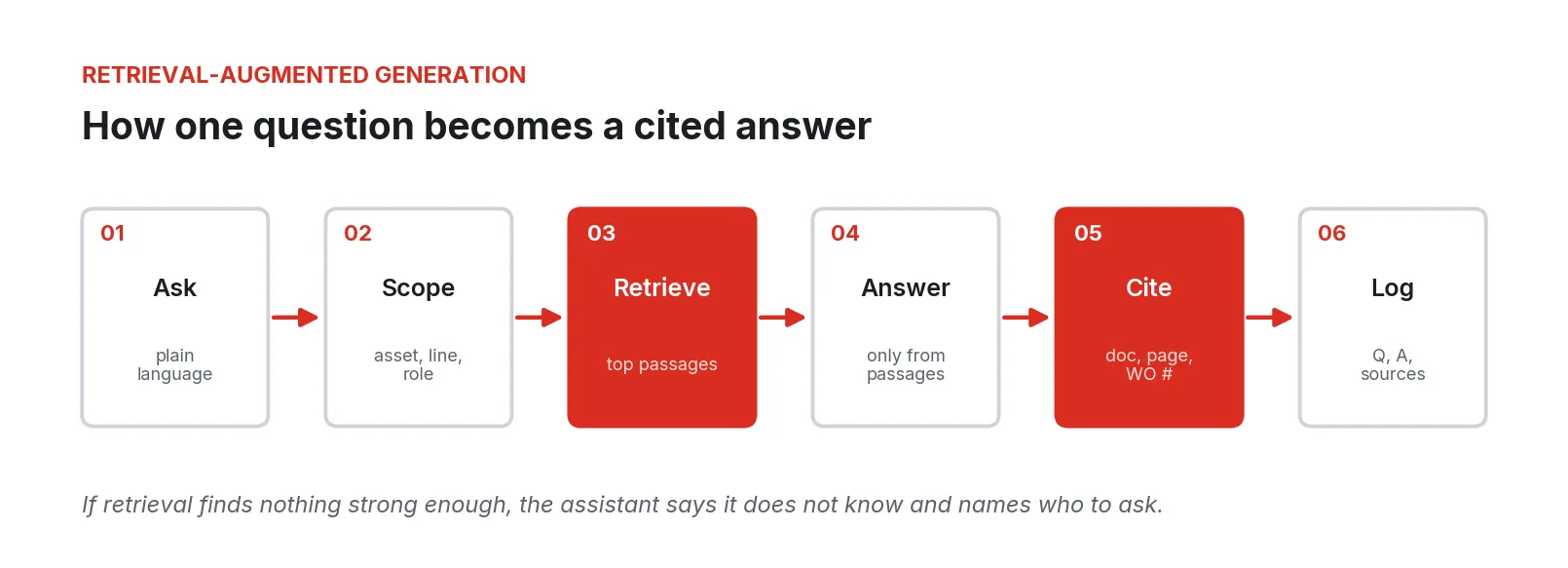
Figure 4. The retrieval-augmented answer path. Retrieval and citation are the steps that make an answer checkable at the machine.
1. Ask. “Packer 3 is showing 214 on axis 2. What usually causes it?”
2. Scope. The assistant resolves “Packer 3” to the asset ID, knows the tech’s role and line, and narrows the search to that machine’s manuals, prints, and work orders.
3. Retrieve. It pulls the top few passages: the fault table entry on page 412, the troubleshooting tree on page 415, and the three closed work orders mentioning 214 on that asset.
4. Answer only from what was retrieved. “Fault 214 is a following error on axis 2. The manual lists encoder cable, mechanical binding, and drive tuning as causes (Manual rev C, p. 412). On this machine, the last three occurrences were closed as a loose coupling set screw on the infeed (WO 18872, 19340, 20115).”
5. Cite. Every sentence that states a fact carries a document, page, or work order number the tech can tap to open.
6. Log. The question, the passages retrieved, the answer, and the model version are recorded.
When retrieval comes back thin, the right answer is “I don’t have anything on that for this machine,” followed by who to call. A tech who gets a confident wrong answer at 2:40 a.m. stops using the tool, and with good reason.
Two research findings matter here. Models attend best to material at the start and end of what they are given and worst to material in the middle of a long context [10], so retrieving five well-chosen passages beats pasting in the whole manual. And retrieval does not by itself remove invented answers: a preregistered Stanford study of commercial retrieval-based legal research tools found they still produced hallucinated answers on roughly 17 to 33 percent of test queries [9]. Plants should expect the same kind of error and design for it.
Designing around wrong answers
NIST’s generative AI profile calls the problem “confabulation,” a model confidently presenting false content, and among its suggested actions is to review and verify the sources and citations a system produces, both before deployment and in ongoing monitoring [11]. Applied to a maintenance assistant, that turns into concrete rules:
1. No citation, no claim. If a factual sentence cannot be tied to a retrieved passage, it is removed before the answer is shown.
2. Refuse below a retrieval threshold. Tune the cut-off on your own pilot questions. Saying “I don’t know” is a feature.
3. Quote numbers, do not compute them. Torque values, pressures, setpoints, and part numbers are shown as they appear in the source, with the page, and never rounded, converted, or inferred.
4. Show the page. The tap-through to the actual PDF page or work order is what lets an experienced tech catch an error in seconds.
5. Score the pilot. Senior techs grade a set of real questions as correct, partially correct, wrong, or refused. Keep that set and rerun it every time the model, the prompt, or the index changes.
6. Watch the log. “I don’t know” answers show gaps in the document set; wrong answers show gaps in retrieval.
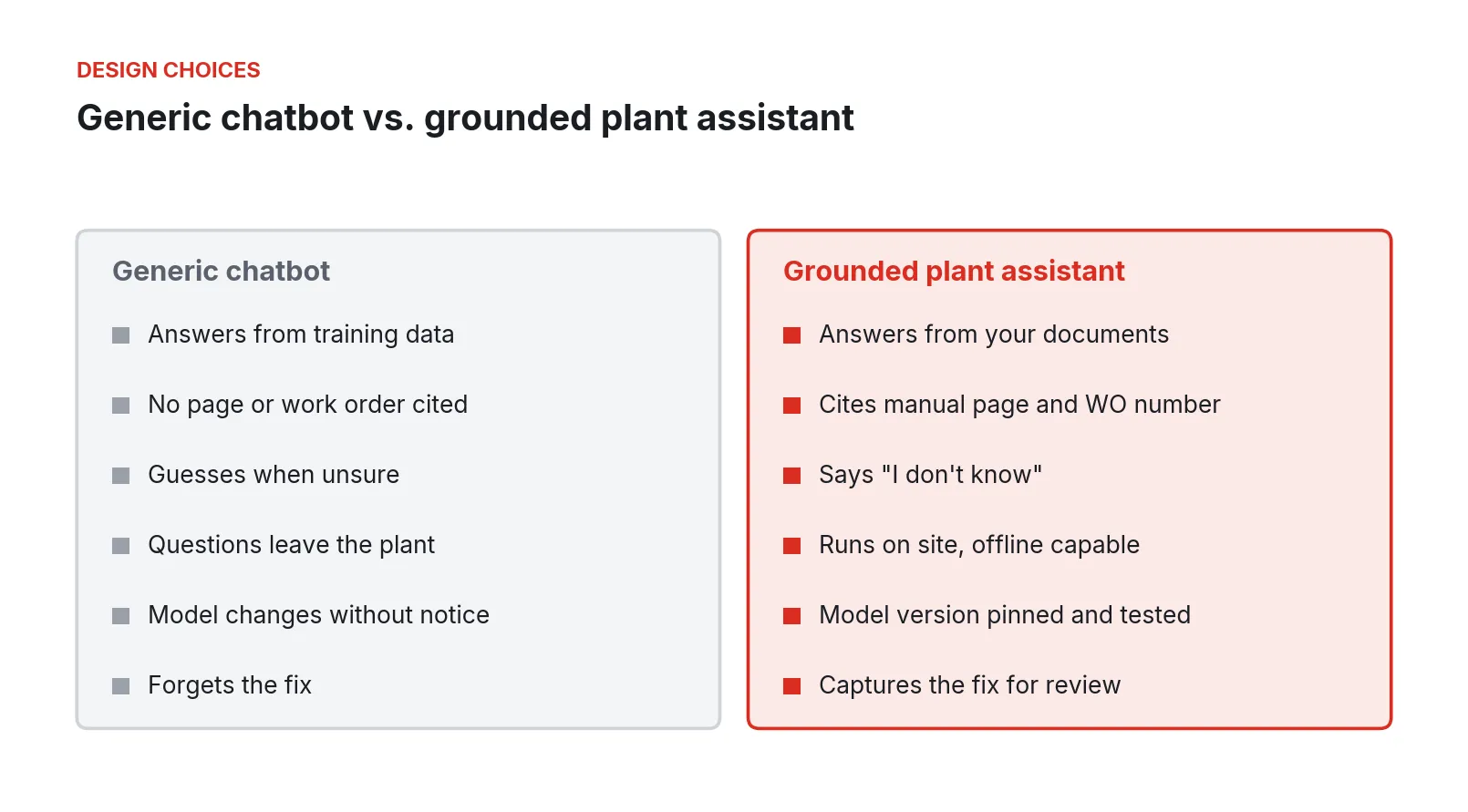
Figure 5. Design choices that separate a general-purpose chatbot from an assistant grounded in plant records.
Self-hosted open models or a cloud service
Both work technically. The decision turns on four plant-specific questions.
1. What leaves the building. Every question carries context: asset names, process details, recipe parameters, sometimes a pasted section of a proprietary procedure. With a cloud model, that context goes to a third party under its terms. With a self-hosted open-weight model, it stays on the plant’s hardware. For many manufacturers, process know-how is the trade secret.
2. Cost shape. Cloud models bill per token, and retrieval-augmented prompts are long because they include the retrieved passages. A self-hosted model has a hardware cost up front and power after that. Run the arithmetic on your expected question volume; for a single plant the hardware is often modest.
3. Model changes. Cloud providers retire models on published schedules. One major provider’s deprecation page commits to at least six months’ notice for generally available models and lists older models with fixed shutdown dates [13]. A retired or silently updated model can change answers your techs have learned to trust. A self-hosted model stays at the version you tested until you choose to change it and rerun your scored question set.
4. Offline operation. A floor tool that stops working when the WAN drops is unavailable at the moments it is most needed.
The largest cloud models are generally stronger at open-ended reasoning. For finding and citing the right passage in your own records, a smaller local model with good retrieval is usually enough, and pilot scoring will show whether it is.
Walking through the work
The order below puts the cheapest, most durable work first. Steps 1 through 3 improve maintenance whether or not an assistant ever ships.
1. Measure your MTTR split on one line
For four weeks, have techs record five timestamps on every unplanned stop on the pilot line: fault, cause identified, isolation complete, parts in hand, running. A paper sheet on the machine works. This is your baseline.
2. Gather and fix the documents
Collect the line’s manuals, prints, fault lists, and SOPs. OCR the scans and spot-check pages with tables. Confirm each manual’s revision against the installed machine. Reconcile HMI alarm text with manual text. Write the glossary. This is tedious and it is most of the value.
3. Clean three years of work orders
Export the line’s work orders. Map them to asset IDs. Have a senior tech and a reliability engineer tag each with failure mode, cause, and action from a short controlled list. The NIST technical language processing work describes tools for exactly this kind of machine-assisted annotation [7]. A few hundred work orders is a few days of effort, and the result is a failure history you can chart even without an assistant.
4. Build the index and run a dry pilot
Index the cleaned documents and work orders with page and record numbers preserved. Have senior techs write 50 to 100 real questions from their own experience, with the answers they would give. Score the assistant on them. Fix retrieval before tuning the model.
5. Put it on the floor for one line
Give night and weekend shifts a tablet or terminal at the machine. Keep the log running and let techs flag wrong answers with one tap.
6. Close the loop at close-out
When a repair finishes, the assistant drafts a work order entry from what the tech told it: asset, symptom, fault code, cause, action, parts, time. The tech edits and submits; a planner reviews before it enters the CMMS. This is how the retiring expert’s knowledge starts to stay in the building, one repair at a time.
7. Add live context, read-only
Once answers are trusted, add the alarm sequence before the stop and a read-only snapshot of the relevant tags, so “What usually causes 214?” can become “Axis 2 lag climbed for 40 seconds before the trip; the last three times that was the infeed coupling.” Then add parts lookups with bin and on-hand quantity.
Where these projects go wrong
1. Indexing the share drive as-is. Superseded revisions, duplicates, and image-only scans produce confident answers from the wrong document.
2. No refusal path. Assistants tuned to always answer will fill gaps with plausible text. Techs notice within a week and stop using it.
3. Citations that do not open. A citation that points to “Manual, section 4” instead of the page a tech can see is not checkable at the machine.
4. Skipping close-out capture. Without it, the assistant knows only what the plant knew on the day it was indexed, and the retiring-expert problem continues.
5. Unscoped access. Indexing everything for everyone exposes HR files, recipes, and contracts to the floor tablet. Access rules should follow the source system.
6. Untrusted text in the index. OWASP ranks prompt injection as the top risk for large language model applications and specifically describes instructions hidden in external documents that a model later reads [12]. Vendor PDFs and emailed service bulletins are external documents. Treat ingestion as a controlled step and keep the assistant without any ability to act on what it reads.
7. Silent model changes. A provider-side update, or a casual local upgrade, changes answers without anyone rerunning the scored questions.
8. Treating it as an IT chatbot project. If maintenance leadership and senior techs do not own the question set, the glossary, and the scoring, the tool will answer questions nobody on the floor asks.
Safety boundaries and LOTO
OSHA’s control of hazardous energy standard, 29 CFR 1910.147, requires an energy control program with written procedures that state the scope, authorization, and techniques for isolating each machine, periodic inspection of those procedures at least annually, and training for authorized and affected employees [15]. It is also among OSHA’s most-cited standards, ranked fourth in the preliminary FY2025 list with 2,177 violations [16].
An assistant fits inside that program with clear limits:
- It may retrieve and display the current approved energy control procedure for the asset, with its document number and revision.
- It never summarizes, reorders, shortens, or paraphrases isolation steps. It shows the procedure as written.
- It never tells a tech that energy is isolated, that a machine is safe to enter, or that a step can be skipped. Questions of that kind return the procedure and the name of the authorized person to ask.
- It never writes to a controller, resets a fault, or changes a setpoint.
- Indexed procedures come from document control, so a revision change in document control changes what the assistant shows.
Joint guidance from CISA, the Australian Cyber Security Centre, and partner agencies sets four principles for integrating AI into operational technology and asks owners to continuously monitor and validate their models [14]. A read-only, cite-or-refuse assistant outside the control path is the conservative way to follow it.
Security and compliance
The ISA/IEC 62443 series sets requirements for industrial automation and control system security across asset owners, integrators, and product suppliers, including an asset owner security program (62443-2-1) and a shared responsibility model among those parties [17]. Its zone and conduit approach applies directly to a maintenance assistant:
1. Place the assistant in its own zone. It reads from the control zone through a defined conduit and has no path back into it.
2. Make the conduit one-way in practice. Tag and alarm reads go through a gateway with read-only credentials, scoped to the assets the assistant covers.
3. Control remote access. Support should not require inbound ports or a standing VPN.
4. Log everything. Who asked what, what was retrieved, what was answered, by which model version, and who approved captured fixes. That log supports incident review and the NIST AI 600-1 practice of monitoring outputs and their sources [11].
5. Patch with a way back. The edge node’s OS and apps need updates that can be reversed.
None of this makes a site compliant on its own. The site’s security and safety programs own compliance; the architecture should make their controls easy to apply and easy to evidence.
A phased rollout
Figure 6. A phased rollout, starting with one line’s records and ending with live context and wider coverage.
1. Weeks 1 to 4: gather. Measure the MTTR split, collect and fix documents, clean work orders, write the glossary.
2. Weeks 5 to 8: pilot. Build the index, have senior techs write and score the question set, then put the assistant on one line’s night and weekend shifts.
3. Weeks 9 to 12: close the loop. Turn on close-out capture with planner review. Compare the diagnosis portion of MTTR against the baseline.
4. Quarter 2: live context. Add read-only alarm sequence, tag snapshots, and parts lookup.
5. Quarter 3 and after: extend. Add lines, shifts, and languages, one at a time, each with its own scored question set.
What to do Monday
Pick the line whose night calls you dread. Tape a five-timestamp sheet to the main machine and leave it there for a month. Pull that line’s work orders for the past three years into a spreadsheet and read fifty of them with your best senior tech; count how many tell you the cause. Find the manual revision that matches the machine and check whether its pages have text you can search. Ask the two people whose phones ring at night to write down the ten faults they get called about most and what they do for each.
At the end of the month you will know where your repair minutes go, how much of your plant’s knowledge is written down, and what an assistant would have to read to be useful.
Fireball Industries is EmberNet’s master integrator. Fireball’s engineers design, build, and support this work on the plant floor: measuring the repair baseline, cleaning and indexing work order history and OEM documentation, standing up the assistant on site-owned edge hardware, connecting read-only alarm and tag data from existing controllers, and keeping it inside the plant’s safety and security programs as it grows from one line to the whole site.
Sources
- Siemens AG (Senseye Predictive Maintenance). “The True Cost of Downtime 2024.” 2024. https://assets.new.siemens.com/siemens/assets/api/uuid:1b43afb5-2d07-47f7-9eb7-893fe7d0bc59/tcod-2024_original.pdf
- Dan Zeiger, Institute for Supply Management. “The Monthly Metric: Unscheduled Downtime.” Inside Supply Management, August 27, 2024. https://www.ismworld.org/supply-management-news-and-reports/news-publications/inside-supply-management-magazine/blog/2024/2024-08/the-monthly-metric-unscheduled-downtime/
- John Coykendall, Kate Hardin, John Morehouse, Victor Reyes, Gardner Carrick; Deloitte and The Manufacturing Institute. “Taking charge: Manufacturers support growth with active workforce strategies.” April 3, 2024. https://www.deloitte.com/us/en/insights/industry/manufacturing-industrial-products/supporting-us-manufacturing-growth-amid-workforce-challenges.html
- Kate Magill, Manufacturing Dive. “Manufacturing could be short 1.9M workers if the talent gap isn’t fixed.” April 16, 2024. https://www.manufacturingdive.com/news/manufacturing-labor-shortage-2033-deloitte-mi-report-2024/713133/
- US Bureau of Labor Statistics. “Industrial Machinery Mechanics, Maintenance Workers, and Millwrights.” Occupational Outlook Handbook, accessed September 2026. https://www.bls.gov/ooh/installation-maintenance-and-repair/industrial-machinery-mechanics-and-maintenance-workers-and-millwrights.htm
- Reliable Plant. “Mean Time To Repair (MTTR) Explained.” Undated, accessed September 2026. https://www.reliableplant.com/mttr-31713
- Michael P. Brundage, Thurston B. Sexton, Melinda Hodkiewicz, Alden A. Dima, Sarah Lukens; NIST. “Technical Language Processing: Unlocking Maintenance Knowledge.” Manufacturing Letters, December 11, 2020. https://www.nist.gov/publications/technical-language-processing-unlocking-maintenance-knowledge
- Patrick Lewis et al. “Retrieval-Augmented Generation for Knowledge-Intensive NLP Tasks.” arXiv, May 22, 2020 (revised April 12, 2021). https://arxiv.org/abs/2005.11401
- Varun Magesh, Faiz Surani, Matthew Dahl, Mirac Suzgun, Christopher D. Manning, Daniel E. Ho; Stanford RegLab. “Hallucination-Free? Assessing the Reliability of Leading AI Legal Research Tools.” 2024. https://reglab.stanford.edu/publications/hallucination-free-assessing-the-reliability-of-leading-ai-legal-research-tools/
- Nelson F. Liu et al. “Lost in the Middle: How Language Models Use Long Contexts.” arXiv, July 6, 2023 (revised November 20, 2023). https://arxiv.org/abs/2307.03172
- National Institute of Standards and Technology. “Artificial Intelligence Risk Management Framework: Generative Artificial Intelligence Profile (NIST AI 600-1).” July 2024. https://nvlpubs.nist.gov/nistpubs/ai/NIST.AI.600-1.pdf
- OWASP Gen AI Security Project. “LLM01:2025 Prompt Injection.” Last modified April 17, 2025. https://genai.owasp.org/llmrisk/llm01-prompt-injection/
- OpenAI. “Deprecations.” OpenAI API documentation, accessed September 2026. https://developers.openai.com/api/docs/deprecations
- CISA, Australian Signals Directorate’s Australian Cyber Security Centre, et al. “Principles for the Secure Integration of Artificial Intelligence in Operational Technology.” December 3, 2025. https://www.cisa.gov/resources-tools/resources/principles-secure-integration-artificial-intelligence-operational-technology
- Occupational Safety and Health Administration. “29 CFR 1910.147, The control of hazardous energy (lockout/tagout).” Accessed September 2026. https://www.osha.gov/laws-regs/regulations/standardnumber/1910/1910.147
- Kevin Druley, Safety+Health. “The most frequently cited standards in FY 2025.” November 24, 2025. https://www.safetyandhealthmagazine.com/27597-the-most-frequently-cited-standards-in-fy-2025/
- International Society of Automation. “ISA/IEC 62443 Series of Standards.” Accessed September 2026. https://www.isa.org/standards-and-publications/isa-standards/isa-iec-62443-series-of-standards
- International Organization for Standardization. “ISO 14224:2016 Petroleum, petrochemical and natural gas industries: Collection and exchange of reliability and maintenance data for equipment.” September 2016. https://www.iso.org/standard/64076.html