

It is 2:40 on a Sunday morning and the autodialer at the Elm Street lift station is calling down its list. The first number belongs to an operator who retired in the spring. The second goes to voicemail. The third reaches the on-call operator, who has no way to see whether the alarm is high wet-well level, a pump fail, or utility power, so he drives forty minutes to find out. Pump 2 tripped on overload, pump 1 is running alone, and the well is two feet below the overflow pipe. He resets the overload, writes the time on a clipboard, and drives back. On Monday nobody can say how long the station ran on one pump, how many times pump 2 has tripped this year, or when the dialer first called.
Most small and mid-size utilities run some version of that night. The water plant has a SCADA system a consultant installed a decade ago. The wastewater plant has a different one. The lift stations have a mix of relay panels, small PLCs, float switches, and autodialers. Somebody set up remote desktop to the plant HMI so the superintendent could check things from home, and the password is on a sticky note. Turbidity and chlorine residual numbers reach the monthly operating report through a spreadsheet, and the discharge monitoring report goes into NetDMR by hand.
That arrangement costs money in windshield time, in overflows that start as an unseen pump trip, in filter and residual data that cannot be produced for the record, and in cyber exposure, which is now an enforcement matter. EPA reported in May 2024 that more than 70 percent of the community water systems it had inspected since September 2023 were in violation of Safe Drinking Water Act Section 1433, with findings that included default passwords never changed, single logins shared by all staff, and former employees who still had access [9].
This paper is for the utility director, the plant superintendent, and the SCADA or I&C technician who have to fix this with the staff they already have. It covers what to measure at each kind of site, a reference architecture that puts every facility on one screen while keeping every plant’s control network off the internet, the order to do the work in, where these projects fail, and how the design lines up with what EPA, CISA, AWWA, and WEF are asking utilities to do.
A self-check for your system
Try to answer these for your own utility today, without calling anyone.
- How many devices in your water and wastewater system can be reached from the public internet right now, and how do you know? Include the HMI that the consultant opened for remote support and any cellular modem at a lift station.
- If an operator who left last year tried to log in to the plant HMI tonight, would it work? Is there more than one operator account?
- For the last high-level alarm at your worst lift station, can you produce the time the alarm started, the time someone acknowledged it, and who that was?
- Which of your lift stations would you not know had lost a pump until a neighbor called about a backup?
- If a filter’s effluent turbidity crossed 1.0 NTU for two consecutive 15-minute readings at 3 a.m., who would know before the next shift, and where is that record kept?
- Where is the current copy of the logic in each PLC, and when was it last compared against what is running in the field?
- When your utility certified its AWIA risk and resilience assessment, did it cover the automated systems at the lift stations, or only the treatment plants?
If two or more of these produced a shrug, the rest of this paper is a practical way to change the answers.
What needs to be measured and connected
The point of “one pane of glass” is having the right signals from every site, timestamped and kept, so that an operator can make a decision without driving and so that a regulator’s question can be answered from the record. The table below lists the signals that matter most at each type of site and where they usually come from.
| Site | Signals | Typical source | Why it matters |
|---|---|---|---|
| Lift station | Wet-well level, high and high-high floats, pump run status, pump fail, runtime and starts | Station PLC or RTU, float relays, motor starters | Rising level with a pump running means a pump problem; runtime drift shows wear and inflow |
| Lift station | Utility power, generator run, ATS position, generator fuel | ATS auxiliary contacts, generator controller | EPA lists power failures among the common causes of sanitary sewer overflows [14] |
| Lift station | Intrusion, door switch, flood switch | Dry contacts to the PLC | Physical barriers are part of the AWIA resilience assessment [12] |
| Water plant | Individual and combined filter effluent turbidity | Online turbidimeters through the filter PLC | Surface Water Treatment Rule limits and 15-minute IFE recording [11] |
| Water plant | Entry point chlorine residual, pH, flow | Residual analyzer, flowmeter | Residual may not stay below 0.2 mg/L for more than four hours [11] |
| Water plant | Chemical feed pump speed and stroke, day-tank level, feed rate | Metering pump controllers, scales or level transmitters | Catches overfeed and underfeed; reconciles chemical use with flow |
| Wastewater plant | Influent flow, dissolved oxygen, blower status, effluent flow, disinfection residual | Plant PLC, analyzers | Permit parameters feed the DMR; blower data drives energy cost |
| Distribution | Tank level, booster pump status, discharge pressure | Booster station PLC or RTU | The Aliquippa attack hit a booster station that regulates pressure [6] |
| All sites | Who logged in, what setpoint changed, from where | HMI, PLC, network edge | The audit question after any upset |
Nearly every signal on that table already exists at the site, wired to something; the work is collecting it. The lift station rows carry most of the operational risk and are usually the least connected. The bottom row is the one most utilities cannot answer after an incident.
Figure 1. Surface Water Treatment Rule turbidity and residual thresholds for conventional and direct filtration plants, summarized from EPA’s 2020 plain-English guide to the rules [11].
Turbidity and residual are recordkeeping problems as much as process problems
Most plant operators know the turbidity limits by heart: combined filter effluent at or below 0.3 NTU in 95 percent of monthly readings, never above 1 NTU, measured every four hours; individual filters recorded continuously at 15-minute intervals, with state reporting when a filter exceeds 1.0 NTU in two consecutive readings [11]. Where plants get into trouble is the record. A turbidimeter that logged to a strip chart, a data logger with a full memory card, or an HMI trend that rolls over after 30 days can turn a well-run plant into a plant that cannot prove it was well run. The same is true of entry point residual, where the rule cares about duration below 0.2 mg/L as much as the value [11].
The fix is to treat the historian as a compliance instrument. Every analyzer value that feeds the monthly operating report should be collected at the plant, timestamped at the plant, and kept at the plant even when the link to the office is down. The report should be built from that record, and nobody should be retyping it.
Lift stations are where the hours go
A lift station is simple: a wet well, two or three pumps, floats or a level transducer, a control panel, and often a generator. The failure modes are equally simple. A pump trips or binds on rags, the lead pump runs alone, inflow during a storm exceeds what one pump can move, and the well rises. EPA estimates at least 23,000 to 75,000 sanitary sewer overflows a year in the United States, and lists blockages, power failures, and vandalism among the causes [14]. EPA’s guide for evaluating collection system O&M programs asks whether pump stations have emergency power, whether generators are exercised under load, and how flow monitoring data are used [16].
The data that answers those questions is cheap to get: pump run status and starts from the motor starter auxiliary contacts, level from the transducer that is probably already there, and power and generator status from the ATS. Trended over a month, pump runtime per day shows wear, inflow and infiltration after a storm, and the station that is quietly running one pump.
A reference architecture: one pane, dark plants
The design goal has two halves that utilities often treat as opposites. Supervisors and on-call operators need to see every facility from wherever they are. Every plant and station control network needs to be unreachable from the internet. Both are achievable at once if the connection is turned around: nothing outside the site opens a connection into the site; a single device at each site dials out to a central console, and people reach the site through that console based on who they are.
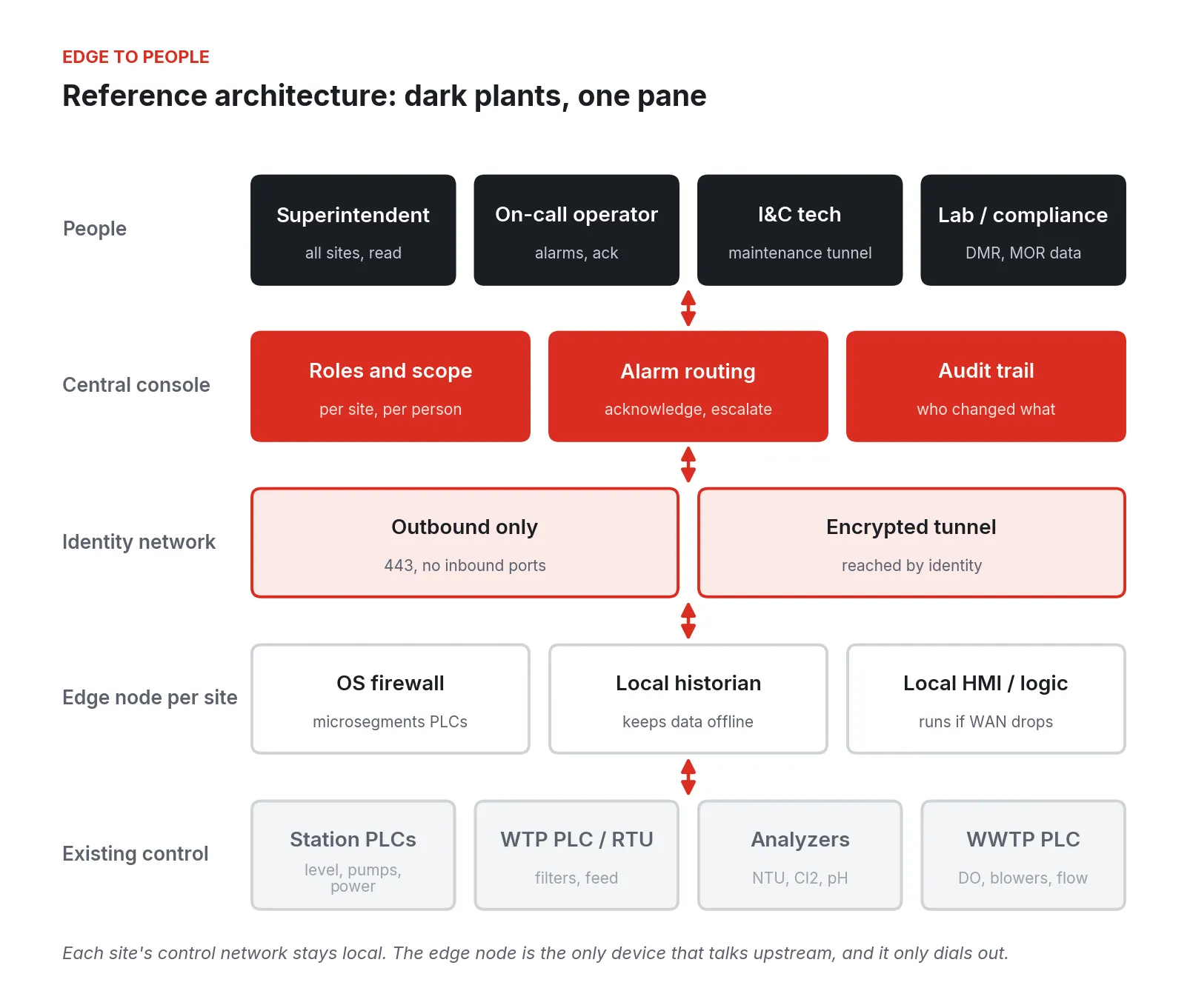
Figure 2. Reference architecture. Existing PLCs and analyzers stay on a local network at each site; an edge node per site segments them, keeps a local historian, and makes the only upstream connection, outbound.
From bottom to top:
-
Existing control. Station PLCs, the plant PLC or RTU, and the analyzers keep doing what they do today. Nothing here requires replacing them.
-
An edge node at each site. One industrial computer with its own firewall sits between the control network and everything else. It polls the PLCs over the protocols they already speak (Modbus, EtherNet/IP, DNP3), keeps a local historian, and can host a local HMI or supervisory logic that keeps running if the WAN drops.
-
An identity-based network. The node makes outbound encrypted connections only, so a scan of the site’s public address finds nothing to talk to.
-
A central console. Every site in one place, with role-based access (the superintendent reads everything, the on-call operator acknowledges alarms, the I&C technician opens a maintenance session to one PLC), alarm routing, and an audit trail.
-
People. On a laptop, a tablet in the truck, or a phone at 2:40 a.m.
Why the edge node matters more than the screen
The shortcut to a single screen is to expose each PLC or HMI to the internet, or give a vendor a standing VPN. The 2023 Unitronics attacks exploited exactly that exposure. With an edge node, the PLC only talks to the node on a local wire, and the node only talks outward.
The node also absorbs unreliable radio and cellular links to lift stations. With a local historian, a two-hour outage is a gap in the live view, and the data fills in when the link returns.
Doing the work, cheapest fixes first
The order below is deliberate. The first steps cost almost nothing and close most of the exposure that EPA and CISA keep finding. The later steps build the operating value.
Step 1: Find out what is exposed and close it
CISA, EPA, and FBI put “reduce exposure to the public-facing internet” first on their list of top cyber actions for water systems, followed by assessments, changing default passwords, and an asset inventory [10]. The fact sheet points utilities to cyber hygiene services to find exposed assets, and EPA offers cybersecurity evaluations and technical assistance to water systems [20]. Start there.
- Enroll in the cyber hygiene services the fact sheet recommends, or request an EPA cybersecurity evaluation, to find what is exposed on your public IP addresses [10][20].
- Walk every site and list every device with a network connection: PLCs, HMIs, cellular modems, radios, the PC under the operator’s desk, and the vendor-installed remote access box.
- Change every default password you find. The Unitronics alert specifically called out the default password “1111” and exposure on TCP port 20256 [5].
- Remove remote desktop software from HMI and SCADA computers, or at minimum disable unattended access, as the Oldsmar advisory recommended [1].
- Give every operator a named account and remove accounts for people who have left. Shared logins and lingering access were among EPA’s most frequent inspection findings [9].
- Back up the logic and configuration of every PLC and HMI, and keep a copy off site. CISA’s Unitronics guidance listed backing up logic and configurations for fast recovery [5]; the top-actions sheet calls for the 3-2-1 approach [10].
None of this needs new hardware or a budget line. It needs a week, a clipboard, and someone with authority to say the remote desktop is coming out.
Step 2: Put the first plant behind an edge node
Pick the plant with the most exposed remote access today. Install an edge node between its control network and everything else, start the local historian, route remote access through the outbound tunnel, and remove the old path.
The test for this step is simple: from outside the plant, nothing answers. From the superintendent’s laptop, the plant shows up in the console.
Step 3: Bring the lift stations in
Lift stations are where the operational payback lives. For each station:
- Collect level, pump run, pump fail, and power and generator status from the existing station PLC, or wire the dry contacts into a small I/O module on the node where there is no PLC.
- Define the alarms that matter (high level, high-high level, pump fail, power fail, generator fail, intrusion) and route them to the on-call list with acknowledgment and escalation.
- Trend pump runtime and starts per day.
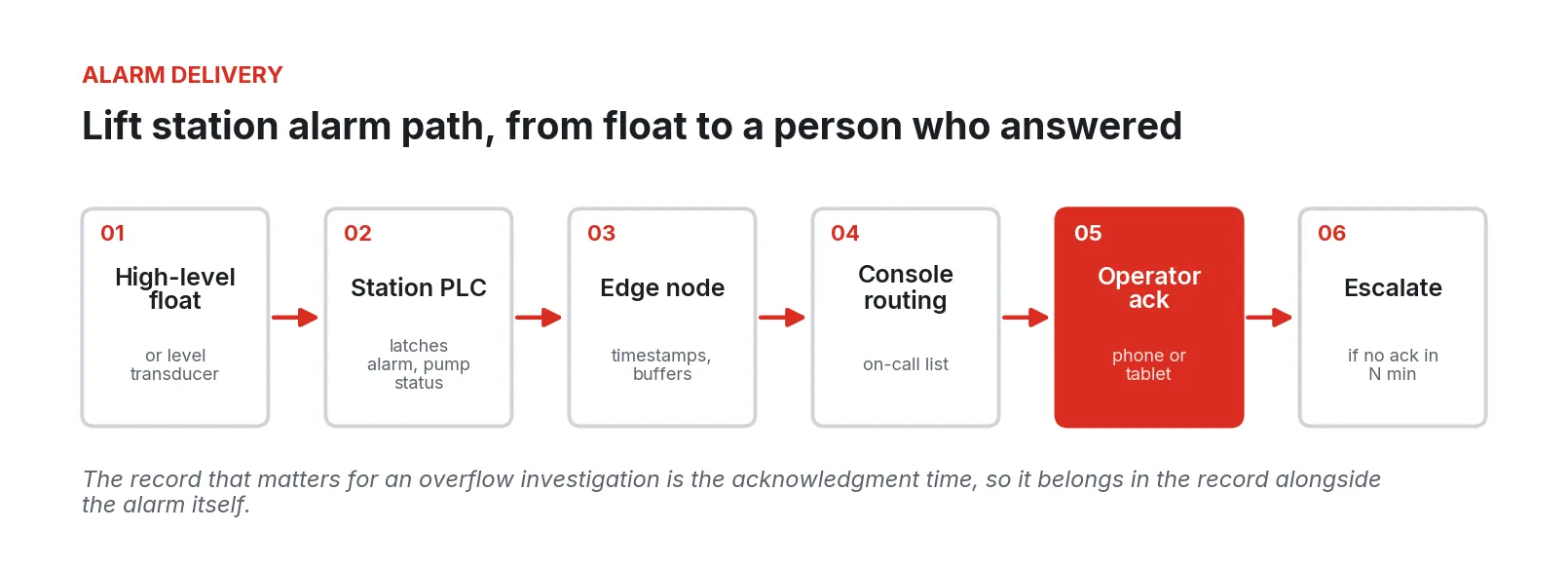
Figure 3. Lift station alarm path with acknowledgment. The routed alarm records when the alarm started, who acknowledged it and when, and escalates if nobody does.
The autodialer does not have to come out on day one. Many utilities keep it as an independent backup for high-high level, which is a reasonable choice: an alarm path that does not depend on the network is worth keeping. What changes is that the primary alarm now leaves a record, reaches a person who can see the station’s trend before deciding to drive, and escalates if that person does not answer.
Step 4: Build compliance data from the record
Once the plant historian is running, the monthly operating report and the DMR stop being typing exercises. Combined and individual filter turbidity, entry point residual, flows, and permit parameters come straight from the historian, with gaps and analyzer faults flagged rather than silently filled. NPDES permittees have been required to submit DMRs electronically since December 2016, and EPA’s electronic reporting rule extended electronic submission to sewer overflow and bypass reports and other program reports in its second phase, dated December 21, 2025 [15]. Building those reports from the same record the operators use removes a step where numbers get mistyped.
Step 5: Migrate as equipment ages
Most utilities have at least one unsupported controller with a used spare in a drawer. With the node already in front of it, the next failure need not be an emergency; the logic can move to a supported controller or a virtual PLC on the node, one station at a time.
Where these projects go wrong
Recent incidents and enforcement findings catalog how small-utility SCADA fails. Few involve sophisticated attackers.
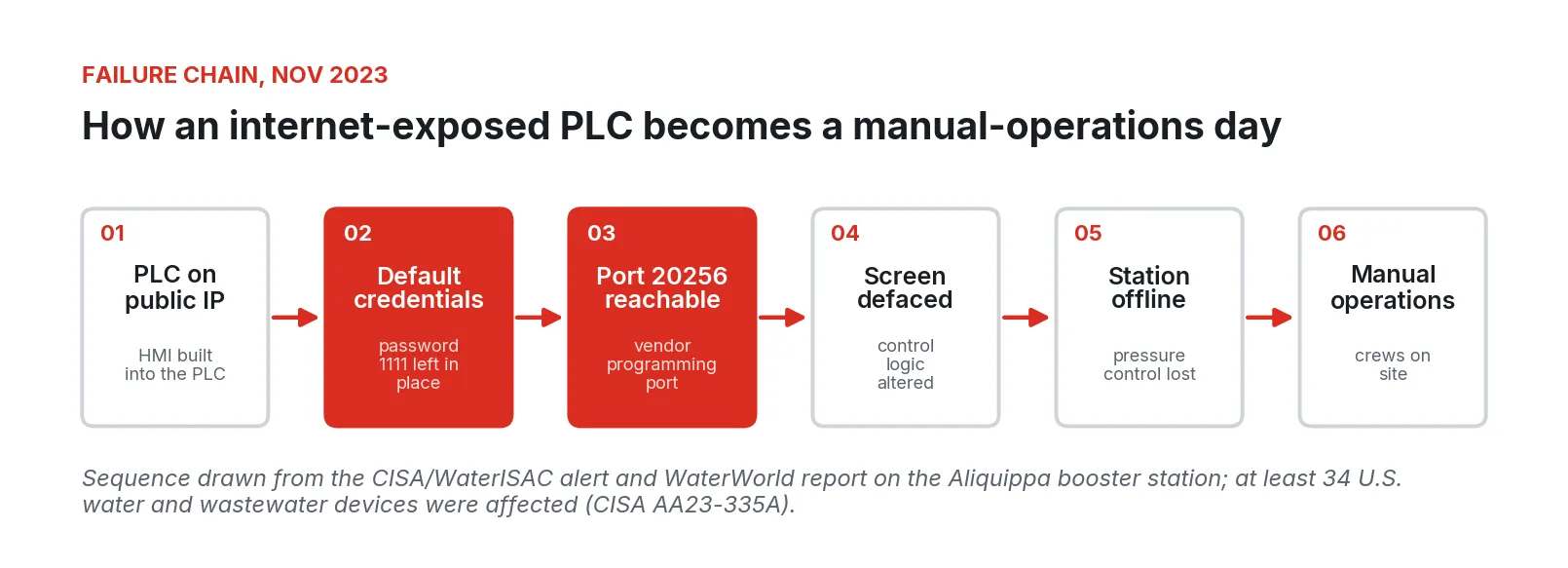
Figure 4. Failure chain at the Aliquippa booster station in November 2023, drawn from the CISA/WaterISAC alert and WaterWorld’s report; CISA later counted at least 34 affected devices in the U.S. water and wastewater sector [5][6][7].
Remote access that was set up for convenience and never revisited
In February 2021, operators at the Oldsmar, Florida, water plant saw the sodium hydroxide setpoint on the HMI change from 100 ppm to 11,100 ppm and set it back within minutes [2]. The joint advisory that followed pointed to desktop-sharing software, an unsupported Windows 7 operating system, and poor password practices [1]. In 2023 the city’s former manager said the event was an employee error, and the FBI said it could not confirm a targeted intrusion [3][4]. The lesson holds either way. A plant where one remote desktop session can move a chemical setpoint by a factor of 100, with no record that settles who did it, has an access control and audit problem whatever the cause.
Control devices on the public internet with default credentials
In November 2023, attackers defaced and disabled a Unitronics PLC at the Municipal Water Authority of Aliquippa’s booster station, which regulates pressure for two townships; the authority took the system offline and ran it manually [6]. The WaterISAC-published CISA alert noted the default password “1111” and exposure on TCP port 20256 [5], and CISA’s later advisory counted at least 75 compromised devices, at least 34 of them in the U.S. water and wastewater sector [7]. These PLCs control pumps, chemical feed, and compliance data collection at water facilities [8]. The common thread was a device with a built-in HMI, reachable from the internet, with its factory credentials.
Shared accounts and access that outlives employment
EPA’s May 2024 enforcement alert lists default passwords, single logins for all staff, and former employees who keep access as recurring findings at inspected systems [9]. Shared accounts feel practical with a handful of operators, but they make it impossible to say who changed a setpoint.
Alarm systems that page nobody, or everybody
Autodialers that call a stale list, nuisance alarms that teach operators to ignore the phone, and setpoints untouched since commissioning all end with a resident reporting the overflow. Tie the on-call list to the actual schedule and review which alarms fired and how fast they were answered.
Projects that depend on the people who are retiring
An interagency report to Congress in 2024 estimated that about one-third of U.S. water utility operators will be eligible to retire within ten years, and noted that small systems often have a single operator who must be available every day [17]. A Great Lakes Now report the same year cited Bureau of Labor Statistics estimates of roughly 10,000 positions a year to fill [18]. A SCADA system that lives in one technician’s head is a staffing risk. Remote visibility does not replace certified operators, but it lets a small crew cover more sites with fewer trips, and versioned logic and named accounts survive a retirement.
A central system that becomes the single point of failure
Some projects move control logic or alarm processing to a central server, so a fiber cut or cloud outage blinds every station. Keep control and first-line alarming local; if the console is unreachable, each site keeps running and logging.
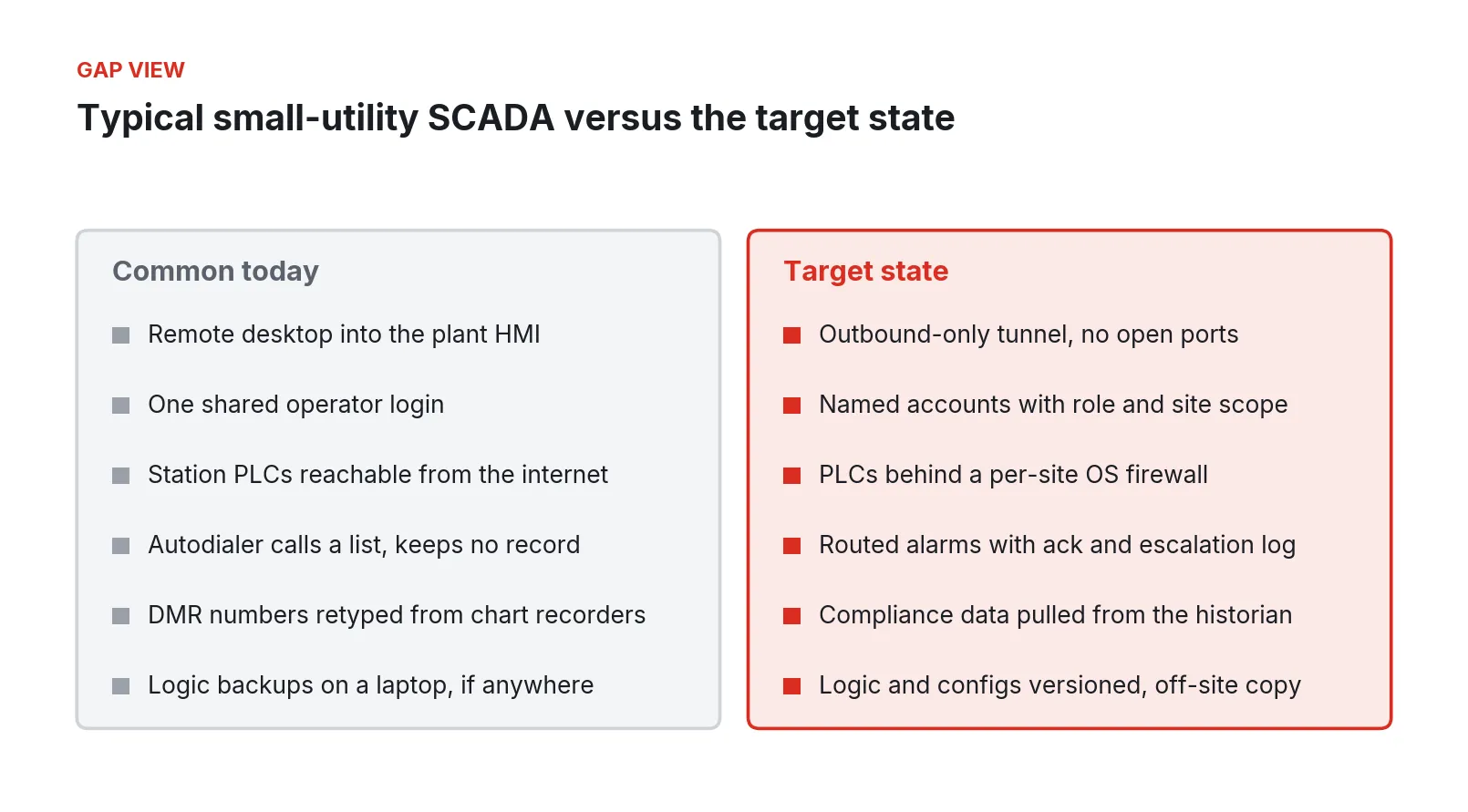
Figure 5. Common small-utility SCADA practices and the target state this architecture aims for.
Security and compliance in the regulators’ terms
No architecture makes a utility compliant. The utility’s own risk and resilience assessment, emergency response plan, and cybersecurity program do that. What an architecture can do is make the controls those programs call for practical to carry out and easy to show. The table below maps the main expectations to the design in this paper.
| Requirement or guidance | What it asks for | How the architecture supports it |
|---|---|---|
| AWIA Section 2013 / SDWA 1433 risk and resilience assessment | Assess risk to the system, including electronic, computer, or other automated systems and their security, plus monitoring practices and chemical handling [12] | Site-by-site asset inventory from the edge nodes; documented segmentation and access paths for the assessment |
| AWIA emergency response plan | Strategies to improve resilience, including detection of threats, and response procedures [12] | Local operation continues if the WAN drops; alarm and audit records support detection and after-action review |
| CISA/EPA/FBI top cyber actions | Reduce internet exposure, change defaults, inventory assets, back up OT systems, patch [10] | No inbound ports at sites; named accounts; versioned logic backups; managed patching of the edge layer |
| EPA enforcement alert, May 2024 | No default passwords, no shared logins, remove former employees’ access [9] | Role-based named access through the console, with an audit trail |
| AWWA Cybersecurity Risk Management Tool | Prioritized controls consistent with NIST CSF 2.0; a 28-control path for systems under 10,000 people [13] | The tool’s output becomes the control list; the architecture supplies evidence for segmentation, access, and logging controls |
| Surface Water Treatment Rule | Turbidity and residual monitoring and records at specified frequencies [11] | Plant-local historian with timestamps at the source; reports built from the record |
| NPDES and 40 CFR Part 127 | Electronic DMRs and overflow reports [15] | Permit parameters and station events kept in one record for reporting |
What the guidance keeps repeating
The CISA/EPA/FBI top actions [10], the EPA enforcement alert [9], the WaterISAC fundamentals [21], and WEF’s 2026 action areas for utilities [19] converge on a short list: know what you have, get it off the internet, stop sharing passwords, back up the logic, and practice for an incident. All of it is within reach of a two-operator utility.
The AWWA tool is the most practical place to turn that into a plan. Version 4.0.0 offers a small-system assessment with 28 controls for systems serving fewer than 10,000 people, and a standard assessment with up to 100 prioritized controls, ranked from basic hygiene to advanced defenses, with recommendations consistent with NIST CSF 2.0 [13]. EPA’s AWIA page lists recertification dates of March 31, 2025, for systems serving 100,000 or more, December 31, 2025, for 50,000 to 99,999, and June 30, 2026, for 3,301 to 49,999, with emergency response plans due six months after each [12]. A utility that just recertified can use the gaps it found as the scope for the work in this paper.
A phased rollout
Figure 6. A phased rollout for a utility with one or two plants and a set of lift stations. Durations are illustrative and depend on site count and staff time.
The sequence follows the steps above. Two choices make it go faster: use the AWWA tool’s output to rank the phase-one gaps, and start the lift station phase with the stations that have overflowed or that operators visit most.
What to do Monday
- Ask your SCADA integrator or your own technician for a list of every way into your control system from outside, in writing. If nobody can produce it, that is the first finding.
- Enroll in the cyber hygiene services named in the CISA/EPA/FBI fact sheet, or request an EPA cybersecurity evaluation.
- Walk into the plant control room and check whether remote desktop software is installed on the HMI. If it is, decide this week whether it stays.
- Pick the lift station your operators complain about most. Pull its pump run hours from the panel meters or the PLC for the last month and compare the pumps. If one is running far more than the other, you have found your first project.
- Pull last month’s individual filter turbidity records and confirm you can produce every 15-minute value for every filter. If there are gaps, find out why before the state does.
- Run the AWWA small-system or standard assessment with your operators in the room. Rank the gaps by what would hurt most on a Sunday at 2:40 a.m.
Who builds this
Fireball Industries is EmberNet’s master integrator. Its degreed engineers design, build, and support this work at water and wastewater utilities: surveying plants and lift stations, putting edge nodes in front of existing PLCs and RTUs, building the alarm routing and historian, connecting compliance reporting to the record, and migrating aging controllers as they fail, while the utility’s existing control keeps running.
Sources
- FBI, CISA, and EPA. “Compromise of U.S. Water Treatment Facility” (Joint Cybersecurity Advisory AA21-042A). February 2021. Copy hosted by Vermont Department of Environmental Conservation. https://dec.vermont.gov/sites/dec/files/dwgwp/documents/FBI_CISA_EPA_Joint_CSA-AA21-042A_Compromise_of_US_Water_Treatment_Facility.pdf
- Idaho National Laboratory, CyOTE program (U.S. Department of Energy). “Precursor Analysis Report: Remote Access Attack on Oldsmar Water Treatment Facility 2021” (INL/RPT-22-70551). December 31, 2022. https://cyote.inl.gov/content/uploads/24/2025/12/CyOTE-Case-Study_Oldsmar.pdf
- CyberScoop. “Did someone really hack into the Oldsmar, Florida, water treatment plant? New details suggest maybe not.” April 10, 2023. https://cyberscoop.com/water-oldsmar-incident-cyberattack/
- Peter Chawaga, Water Online. “Former Official Claims Oldsmar Drinking Water Hack Was Really Operator Error.” March 29, 2023. https://www.wateronline.com/doc/former-official-claims-oldsmar-drinking-water-hack-was-really-operator-error-0001
- WaterISAC. “(TLP:CLEAR) CISA Releases Alert on Exploitation of Unitronics PLCs Used in Water and Wastewater Systems.” November 29, 2023. https://www.waterisac.org/tlpclear-cisa-releases-alert-exploitation-unitronics-plcs-used-water-and-wastewater-systems
- WaterWorld. “Aliquippa, Pennsylvania suffers cyberattack on booster station PLC.” November 30, 2023. https://www.waterworld.com/water-utility-management/article/14302077/aliquippa-pennsylvania-suffers-cyberattack-on-booster-station-plc
- CISA and partner agencies. “IRGC-Affiliated Cyber Actors Exploit PLCs in Multiple Sectors, Including U.S. Water and Wastewater Systems Facilities” (AA23-335A). December 1, 2023, updated December 18, 2024. https://www.cisa.gov/news-events/cybersecurity-advisories/aa23-335a
- David Jones, Cybersecurity Dive. “CISA warns of threat groups exploiting Unitronics PLCs in water treatment hacks.” November 29, 2023. https://www.cybersecuritydive.com/news/cisa-threat-exploiting-unitronics-water/700999/
- U.S. EPA. “Enforcement Alert: Drinking Water Systems to Address Cybersecurity Vulnerabilities.” May 2024. https://epa.gov/enforcement/enforcement-alert-drinking-water-systems-address-cybersecurity-vulnerabilities
- CISA, EPA, and FBI. “Top Cyber Actions for Securing Water Systems.” February 21, 2024. https://www.ic3.gov/CSA/2024/240221.pdf
- U.S. EPA Office of Water. “Surface Water Treatment Rules: What Do They Mean to You?” (EPA 815-R-20-006). June 2020. https://www.epa.gov/sites/default/files/2020-06/documents/swtr_plain_english_guide_final_508_0.pdf
- U.S. EPA. “AWIA Section 2013/SDWA Section 1433: Risk and Resilience Assessments and Emergency Response Plans.” Accessed September 2026. https://www.epa.gov/waterresilience/awia-section-2013
- American Water Works Association. “Water Sector Cybersecurity Risk Management Tool,” version 4.0.0. March 17, 2025. https://cybersecurity.awwa.org/
- U.S. EPA. “Sanitary Sewer Overflows (SSOs).” Accessed September 2026. https://www.epa.gov/npdes/sanitary-sewer-overflows-ssos
- U.S. Electronic Code of Federal Regulations. “40 CFR Part 127: NPDES Electronic Reporting.” Accessed September 2026. https://www.ecfr.gov/current/title-40/chapter-I/subchapter-D/part-127
- U.S. EPA Office of Enforcement and Compliance Assurance. “Guide for Evaluating Capacity, Management, Operation, and Maintenance (CMOM) Programs at Sanitary Sewer Collection Systems” (EPA 305-B-05-002). January 2005. https://www.epa.gov/sites/default/files/2015-10/documents/cmom_guide_for_collection_systems.pdf
- Interagency Water Workforce Working Group (EPA lead). “Report to Congress.” August 2024. https://www.epa.gov/system/files/documents/2024-09/interagency-water-workforce-working-group-report-to-congress_august-2024-508-compliant.pdf
- Lester Graham, Great Lakes Now. “Retirements by water and wastewater plant operators are leading to workforce shortages.” September 23, 2024. https://www.greatlakesnow.org/2024/09/23/retirements-by-water-and-wastewater-plant-operators-are-leading-to-workforce-shortages/
- Water Environment Federation. “Cybersecurity” resources for water and wastewater utilities. August 6, 2026, updated August 18, 2026. https://www.wef.org/resources/for-the-public/cybersecurity/
- U.S. EPA. “Cybersecurity for the Water Sector.” Updated September 22, 2026. https://www.epa.gov/waterriskassessment/epa-cybersecurity-water-sector
- WaterISAC. “Security Fundamentals” (12 Cybersecurity Fundamentals for Water and Wastewater Utilities, 2024). https://www.waterisac.org/fundamentals